Participant
October 20, 2017
Answered

How do I upload a multi-page pdf file into Adobe PDF pack?

  • October 20, 2017
  • 1 reply
  • 833 views

How do I upload a multi-page pdf file into Adobe PDF pack?  I need to sign one page (not the first page) of the multi-page file, and everytime I upload it, it only imports the first page.

This topic is closed to new replies. Start a new post to keep the conversation going.
Correct answer Adorobat

Hi Irenea,

Sorry for the delay in response.

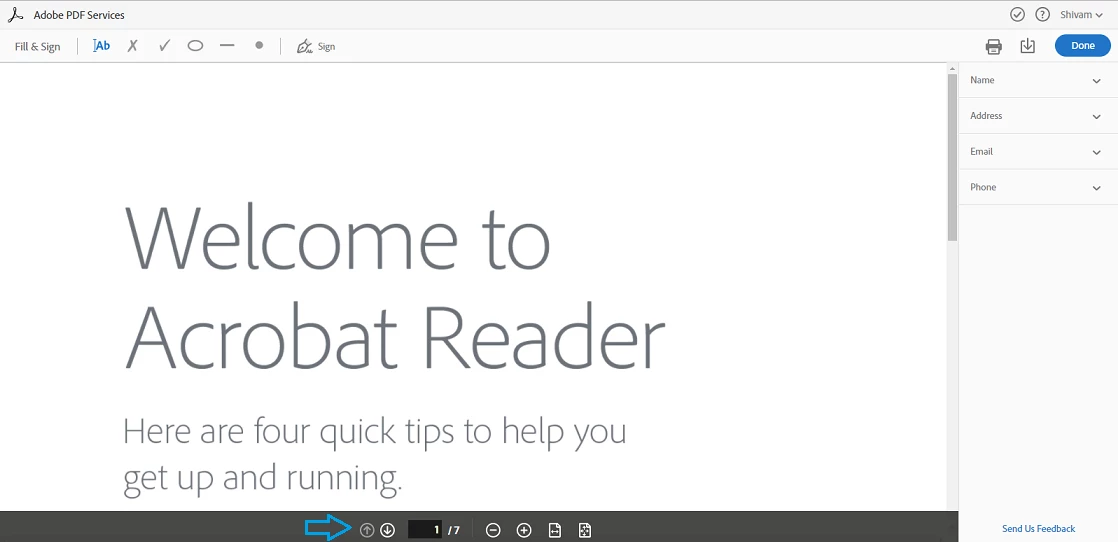
Adobe PDF Pack is an online service (more info here: FAQ | Adobe PDF Pack ) which allows you to create/ export pdf in Adobe Reader application or online in a web browser. Assuming you are referring to signing pdf online, using 'Fill & Sign' option in web browser at this link: https://cloud.acrobat.com/fillsign , try moving mouse to the bottom of the page which brings up page control toolbar using which you can navigate multi-page document clicking down-up arrow on the toolbar. Below is the screenshot:
Let us know if you have a different query.

Shivam

1 reply

Adorobat
AdorobatCorrect answer
Participating Frequently
December 22, 2017

Hi Irenea,

Sorry for the delay in response.

Adobe PDF Pack is an online service (more info here: FAQ | Adobe PDF Pack ) which allows you to create/ export pdf in Adobe Reader application or online in a web browser. Assuming you are referring to signing pdf online, using 'Fill & Sign' option in web browser at this link: https://cloud.acrobat.com/fillsign , try moving mouse to the bottom of the page which brings up page control toolbar using which you can navigate multi-page document clicking down-up arrow on the toolbar. Below is the screenshot:

Let us know if you have a different query.

Shivam

