Participant
April 13, 2015
Answered

How do you add a logo and color to recipient page in document cloud

  • April 13, 2015
  • 1 reply
  • 1273 views

Hi, I'm intrigued in on the Send & Track page there is a box that says "Add your Logo & Colour". If you click on the edit it takes you to the web based pages but I can't see where to do this. I'm clearly missing something obvious - but a help search didn't produce anything. Any help gratefully received.

Cheers
This topic has been closed for replies.
Correct answer Anubha Goel

Hey IanBasford,


Could you please let me know what version of OS are you working on.

After signing in to your account at "https://cloud.acrobat.com/send", please select a PDF file.

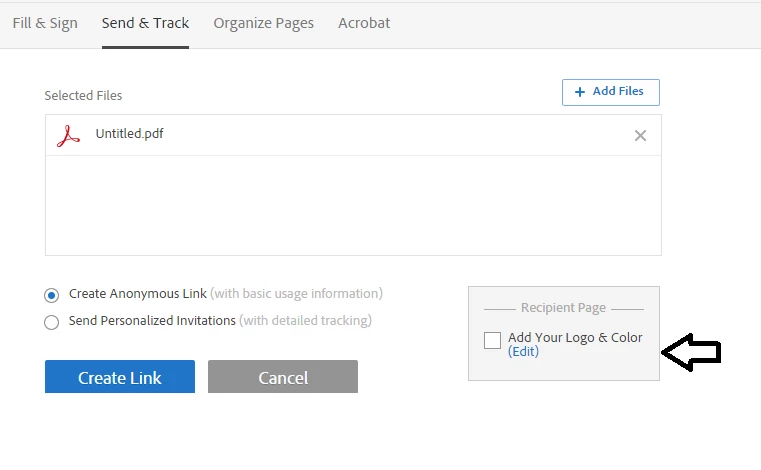
Once the file is uploaded, you will notice a box labeled as Recipient Page on the right hand side. Select 'Add Your Logo & Color' and click Edit (as shown below):

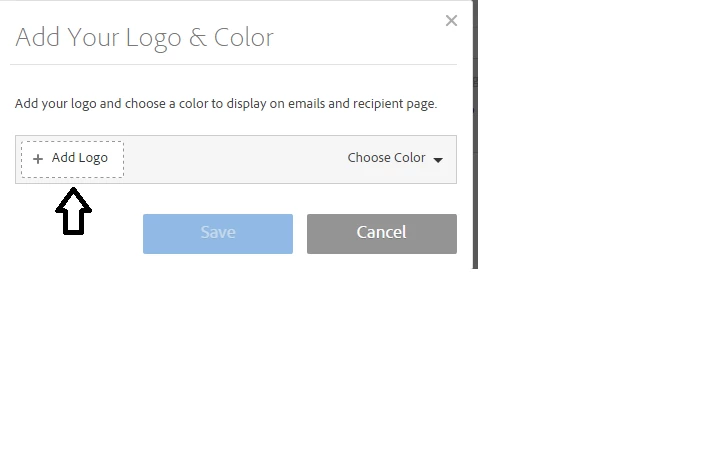
Now, click 'Add Logo' from the new dialog box that appears (screenshot shown below) and then navigate to the location where your logo is stored on the hard disk.

This is it. Please try the same way at your end and let me know if you need further assistance.

Regards,

Anubha

1 reply

Anubha Goel
Anubha GoelCorrect answer
Participating Frequently
April 28, 2015

Hey IanBasford,


Could you please let me know what version of OS are you working on.

After signing in to your account at "https://cloud.acrobat.com/send", please select a PDF file.

Once the file is uploaded, you will notice a box labeled as Recipient Page on the right hand side. Select 'Add Your Logo & Color' and click Edit (as shown below):

Now, click 'Add Logo' from the new dialog box that appears (screenshot shown below) and then navigate to the location where your logo is stored on the hard disk.

This is it. Please try the same way at your end and let me know if you need further assistance.

Regards,

Anubha

Participant
January 16, 2018

This does not work. The following message comes up.

Once on the web interface there are no options to add a logo.

AnandSri
Legend
January 17, 2018

Hello gareths79940305

We apologize for the inconvenience caused, please try to add the logo using a different browser like Chrome, or Firefox, or Safari and see if this brings any difference.

Let us know how it goes.

Regards,

Anand Sri.