


Question
How do you change units of measure ChromeOS - Adobe View Chrome plugin
How do you change units of measure from inches to mm on ChromeOS devices, within Adobe View Chrome web plugin?
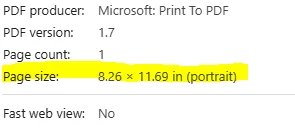
Ive tried setting the region on the device, and also in the plugin settings, but when I try to get the document info for Page Size, its always in inches.
There are no preferences to set like in other versions of Reader where you can change the unit of measurement to the one you prefer.
 AdChoices