


Participant
January 24, 2019
Answered

how to hide toolbars

  • January 24, 2019
  • 1 reply
  • 582 views

When I open any .pdf file in Acrobat Reader DC toolbars surround the document and editing marks appear in the document. How do I remove the toolbars and editing marks? I am working on an HP laptop with Windows 10. Could this be in the Acrobat setup? Where is Setup?

This topic has been closed for replies.
Correct answer AkanchhaS8194121

Hi Marym,

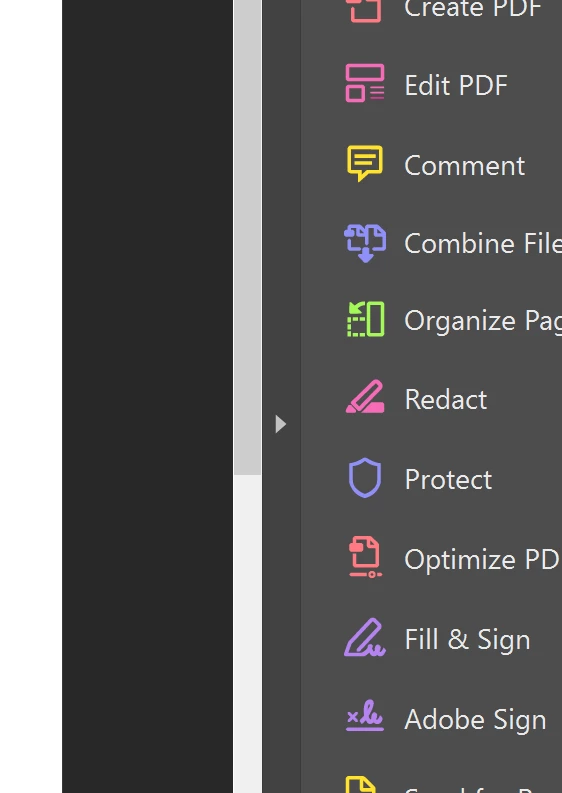
Looking at the information shared above, if we understand your query correctly you are referring to the tool-pane available at the right hand side of Adobe Reader (as shown in screenshot below)?

If yes, then you can control the tool-pane behavior with the application preferences. You may please refer to the help article here- Permanently close the Tools pane in Acrobat Reader DC and follow the steps suggested.

Regards,

Akanchha

1 reply

AkanchhaS8194121
AkanchhaS8194121Correct answer
Legend
January 25, 2019

Hi Marym,

Looking at the information shared above, if we understand your query correctly you are referring to the tool-pane available at the right hand side of Adobe Reader (as shown in screenshot below)?

If yes, then you can control the tool-pane behavior with the application preferences. You may please refer to the help article here- Permanently close the Tools pane in Acrobat Reader DC and follow the steps suggested.

Regards,

Akanchha