
October 30, 2015
Answered

how to stop scrolling in fillable forms?

  • October 30, 2015
  • 1 reply
  • 5941 views

Can some one please please please tell me if I can stop the form from having a scroll bar?  When I create the form from scratch, it happens, but when I create from a template, it doesn't.  I want to create from scratch but don't know how to make the form fillable section to keep getting bigger as content is added without having a scroll bar.
This topic has been closed for replies.
Correct answer Anubha Goel

Hi melissab58588649,

Could you please let me know what version of Acrobat you are using.

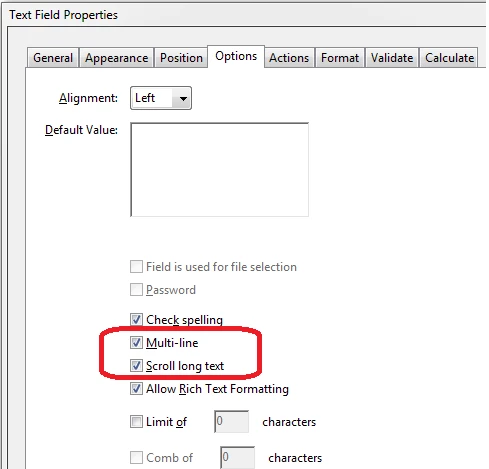
You might need to double-click on a specific form field and open 'Properties > Options tab'.

Then, checkmark 'Scroll long text option' and 'Multi-line' options to enable typing as many characters as you wish.

Let me know if you wish for the same options or something else.

Regards,

Anubha

1 reply

Anubha Goel
Anubha GoelCorrect answer
Participating Frequently
November 3, 2015

Hi melissab58588649,

Could you please let me know what version of Acrobat you are using.

You might need to double-click on a specific form field and open 'Properties > Options tab'.

Then, checkmark 'Scroll long text option' and 'Multi-line' options to enable typing as many characters as you wish.

Let me know if you wish for the same options or something else.

Regards,

Anubha

November 3, 2015

Thanks, I am using DC version….

But now I cannot edit the PDF anymore to try this.

It keeps telling me to “Save a Copy” and I do and then it says the permissions don’t allow me to edit.

Thanks!

Melissa

Anubha Goel
Participating Frequently
November 3, 2015

Hi Melissa,

You can open properties in the Form Editing mode by clicking on Prepare Form.

Regards,

Anubha