

janac29806206
Participant
May 15, 2019
Answered

I am trying to print this file from a file that was shared through Document Cloud...

  • May 15, 2019
  • 2 replies
  • 7487 views

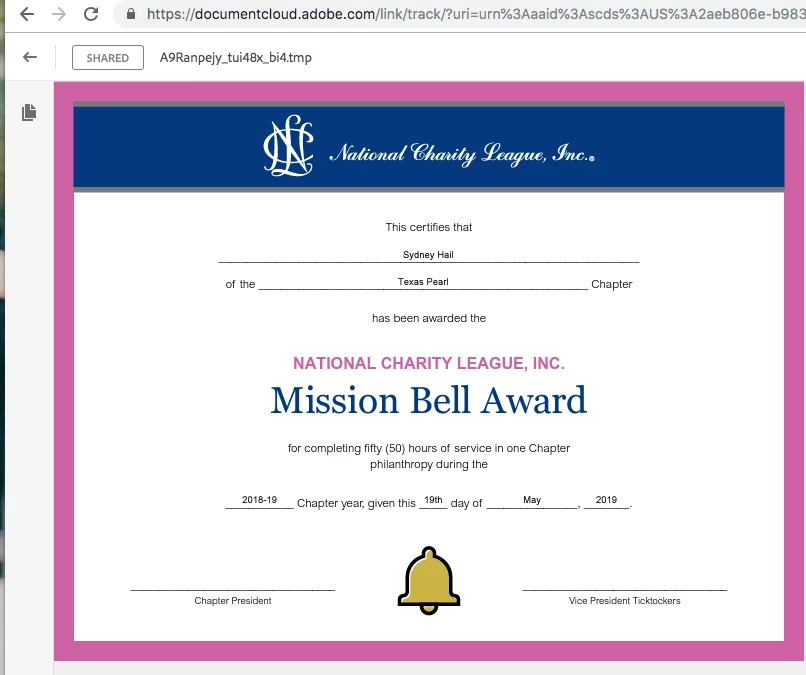
however, when it does, it prints the items at the top (the arrow, SHARED, the file name, search tool bar, etc.  What am I doing wrong?
    This topic has been closed for replies.
    Correct answer AkanchhaS8194121

    Hi Janac,

    Thank you for sharing the screenshot. As per the description, when you are giving the print command, its printing the whole page along with URL, menu-bar etc.

    I see what's happening in your case. The PDF document is opened on Document Cloud web, and when you are giving Ctrl+P (print) command then its printing the entire web page not just the PDF page.

    • If you would like to print the pdf only, then download the PDF first. Click on the "Download" arrow available at the top menu-bar and then open the PDF using free desktop application Adobe Reader DC.
    • If not downloaded yet, then use this link Adobe Acrobat Reader DC Install for all versions
    • From here you can print the PDF file easily.

    This might looks a bit lengthy process, but this is how its going to work. 

    Hope this helps.

    Thanks,

    Akanchha

    2 replies

    Participant
    September 17, 2020

    It is ridiculous that you have to save the file to your device in order to print it!


    AkanchhaS8194121
    AkanchhaS8194121Correct answer
    Legend
    May 15, 2019

    Hi Janac,

    Thank you for sharing the screenshot. As per the description, when you are giving the print command, its printing the whole page along with URL, menu-bar etc.

    I see what's happening in your case. The PDF document is opened on Document Cloud web, and when you are giving Ctrl+P (print) command then its printing the entire web page not just the PDF page.

    • If you would like to print the pdf only, then download the PDF first. Click on the "Download" arrow available at the top menu-bar and then open the PDF using free desktop application Adobe Reader DC.
    • If not downloaded yet, then use this link Adobe Acrobat Reader DC Install for all versions
    • From here you can print the PDF file easily.

    This might looks a bit lengthy process, but this is how its going to work. 

    Hope this helps.

    Thanks,

    Akanchha


