Participant
October 23, 2018
Answered

I can't add to my Cloud files

  • October 23, 2018
  • 1 reply
  • 659 views

I have just installed an Adobe Acrobat DC reader, &, unlike previous readers I've had, this app doesn't have the button to put PDF documents in my Document Cloud file.  Is there another way to do this, or is there a reason I don't have the button?

This topic has been closed for replies.
Correct answer AkanchhaS8194121

Hi Scovil,

As you have mentioned above that you have installed Adobe Acrobat Reader DC and do not see the Document Cloud file option there?

So is it the Document Cloud is not available at let hand side file menu or you are just not able to see the files under it?

Because, with the latest update there isn't any changes to the Document Cloud file storage. It should be available in the file menu list.
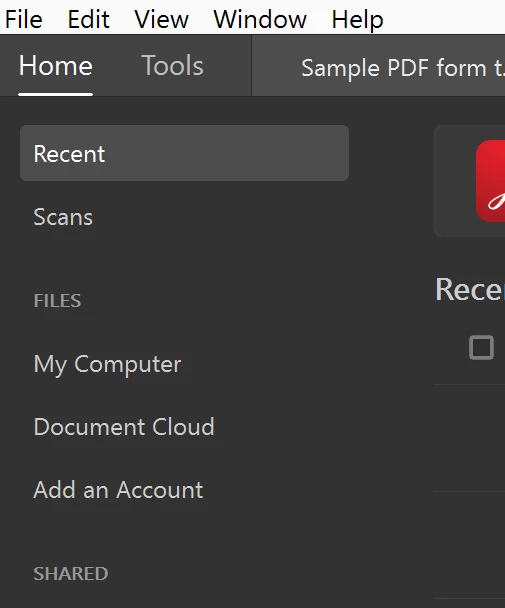
Can you please Sign In in the application and see if that's giving an option to see the Document Cloud storage? Also, share the screenshot of the "Home" screen of your desktop application.

For testing purpose, you may check the same online once- Adobe Document Cloud

Regards,

Akanchha

1 reply

AkanchhaS8194121
AkanchhaS8194121Correct answer
Legend
October 23, 2018

Hi Scovil,

As you have mentioned above that you have installed Adobe Acrobat Reader DC and do not see the Document Cloud file option there?

So is it the Document Cloud is not available at let hand side file menu or you are just not able to see the files under it?

Because, with the latest update there isn't any changes to the Document Cloud file storage. It should be available in the file menu list.

Can you please Sign In in the application and see if that's giving an option to see the Document Cloud storage? Also, share the screenshot of the "Home" screen of your desktop application.

For testing purpose, you may check the same online once- Adobe Document Cloud

Regards,

Akanchha


