

Participant
Aug 21, 2017 6:31 PM UTC
Answered

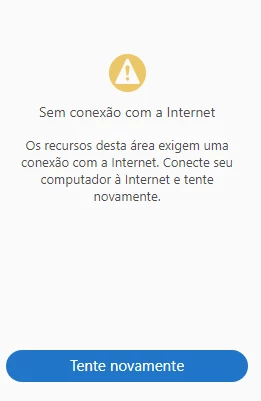
I cannot convert a PDF file to a Doc file - No internet connection.

The message displayed is that there is no internet connection, but I have already tried on several different networks and nothing has changed. The browser works normally.

This topic is closed to new replies. Start a new post to keep the conversation going.
H_SpectorCorrect answer
Adobe Employee
Aug 21, 2017 11:51 PM UTC

Hi cristinac490169050,

Are you using our services in Adobe Reader?

If so please login at https://cloud.acrobat.com with your Adobe ID and password to export your PDF file to Word.

If you cannot export your file from the web site please let me know.

If you see "Service unavailable" page in the web site after login, please try to login from another environment such as home or from your cell phone.

Thank you.

Hisami

3 replies

Participant
Aug 22, 2017 1:46 PM UTC

Yes, I do.

I tried the login from my phone and I got it.

Then I discovered that there was a blockage in my corporate network. The firewall was blocking my access to cloud.acrobat.com

My problem has been solved. Thank you!

Translate
H_SpectorCorrect answer
Adobe Employee
Aug 21, 2017 11:51 PM UTC

Hi cristinac490169050,

Are you using our services in Adobe Reader?

If so please login at https://cloud.acrobat.com with your Adobe ID and password to export your PDF file to Word.

If you cannot export your file from the web site please let me know.

If you see "Service unavailable" page in the web site after login, please try to login from another environment such as home or from your cell phone.

Thank you.

Hisami

Translate
Participant
Aug 22, 2017 1:46 PM UTC

Yes, I do.

I tried the login from my phone and I got it.

Then I discovered that there was a blockage in my corporate network. The firewall was blocking my access to cloud.acrobat.com

My problem has been solved. Thank you!

Translate