
Participant
August 6, 2017
Answered

I have an active Export PDF subscription account, but prompted to upgrade.

  • August 6, 2017
  • 1 reply
  • 733 views

I cannot currently export PDF documents, but I had used the export feature previously with no problems. Now when attempting to export I am prompted to upgrade from a free subscription.
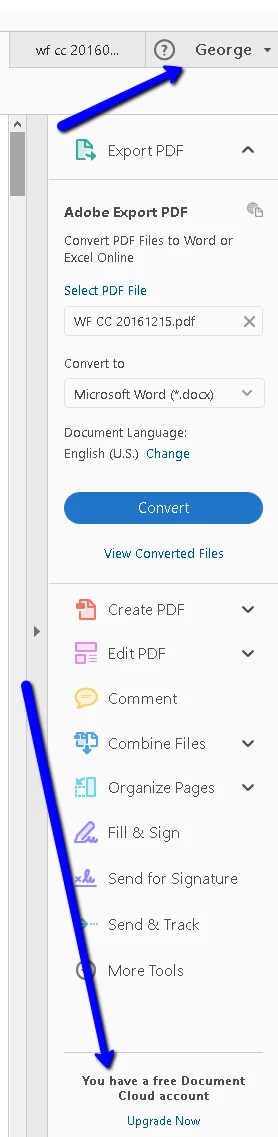
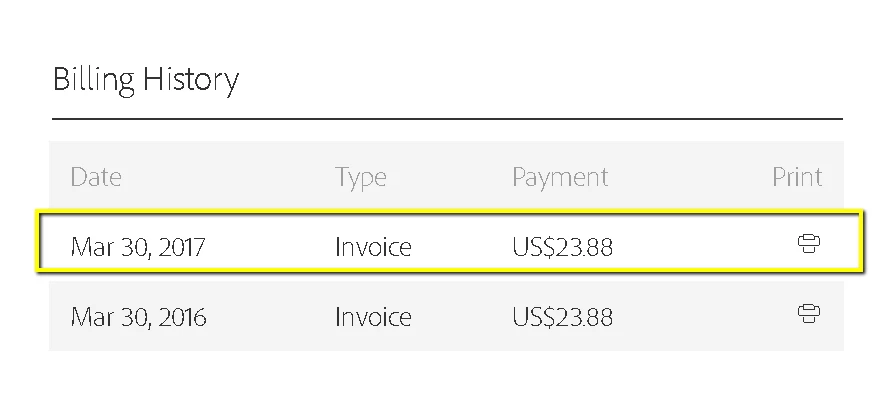
However I already have a current subscription.
The first time I attempted to follow the upgrade link, the page said I could not purchase a 2nd Export PDF subscription! Now I cannot find that page again - I am taken to my account page instead.

Attempts to find a support channel - or reach ones I do find - are in vain (24x7 account help chat interface not working, etc).

This topic has been closed for replies.
Correct answer Adorobat

Hi Georgegi,

Based on the description mentioned above, you are prompted to subscribe for the service when trying to Export PDF, whereas you already have subscription for Adobe Export PDF, is that correct?

Please try the troubleshooting steps given below:

1- Sign-out from the application, relaunch the app, sign back in and try again. (make sure you are using the same email address which you used for Export PDF subscription).

2- If that doesn't work, check if there is an update available for Reader, click "Check for Updates" under Help menu.

You can also access Export PDF service online using this link: https://cloud.acrobat.com/exportpdf

What is the version of Reader and the operating system installed on the machine?

You may refer to this link on how to check dot version for Reader: Identify the product and its version for Acrobat and Reader DC

Thanks,

Shivam

1 reply

Adorobat
Community Manager
AdorobatCommunity ManagerCorrect answer
Community Manager
August 8, 2017

Hi Georgegi,

Based on the description mentioned above, you are prompted to subscribe for the service when trying to Export PDF, whereas you already have subscription for Adobe Export PDF, is that correct?

Please try the troubleshooting steps given below:

1- Sign-out from the application, relaunch the app, sign back in and try again. (make sure you are using the same email address which you used for Export PDF subscription).

2- If that doesn't work, check if there is an update available for Reader, click "Check for Updates" under Help menu.

You can also access Export PDF service online using this link: https://cloud.acrobat.com/exportpdf

What is the version of Reader and the operating system installed on the machine?

You may refer to this link on how to check dot version for Reader: Identify the product and its version for Acrobat and Reader DC

Thanks,

Shivam