December 9, 2025
Answered

Icons in Adobe Chrome Extension are Too Small

  • December 9, 2025
  • 1 reply
  • 226 views

As a few months ago, the icons in Adobe Chrome Extension (for Mac) are way too small to read.  Enlarging the font with Command + does not increase the size of the icons, such as edit or print, but only the size of the document.  I have removed the extension and reinstalled and the problem still persists.  See photo for an example.

Screenshot 2025-12-09 at 9.31.21 AM.png


Please advise.

Correct answer creative explorer

@delita_4806 have you tried opening the PDF on the desktop Acrobat app? Does it do the same too?

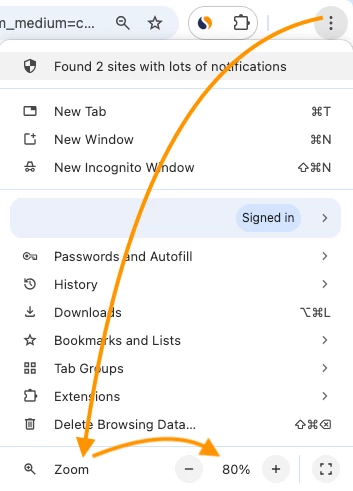
Did you also tried increasing the overall Chrome browser zoom? It might affect the extension's toolbar elements (the icons for edit, print, etc.) differently than the PDF document itself. Click the three vertical dots in the top right of your browser window. Find the Zoom setting and try increasing it to 110% or 125%. After adjusting the browser zoom, use the Acrobat extension's built-in zoom controls (the + and - buttons within the PDF viewer's toolbar) or the keyboard shortcut Cmd+ / Cmd- to adjust the PDF document content back to a comfortable viewing size.

creativeexplorer_0-1765369002909.png


Honestly, I would probably just try using the desktop app. 


1 reply

creative explorer
Community Expert
creative explorerCommunity ExpertCorrect answer
Community Expert
December 10, 2025

@delita_4806 have you tried opening the PDF on the desktop Acrobat app? Does it do the same too?

Did you also tried increasing the overall Chrome browser zoom? It might affect the extension's toolbar elements (the icons for edit, print, etc.) differently than the PDF document itself. Click the three vertical dots in the top right of your browser window. Find the Zoom setting and try increasing it to 110% or 125%. After adjusting the browser zoom, use the Acrobat extension's built-in zoom controls (the + and - buttons within the PDF viewer's toolbar) or the keyboard shortcut Cmd+ / Cmd- to adjust the PDF document content back to a comfortable viewing size.

creativeexplorer_0-1765369002909.png


Honestly, I would probably just try using the desktop app. 


m
December 11, 2025

Thank you so much!  This worked!  I prefer the desktop version as well but as a quick, first read, the extension version is my go to.