This topic is closed to new replies. Start a new post to keep the conversation going.
H_SpectorCorrect answer
Adobe Employee
Aug 24, 2017 5:43 PM UTC

Hi,

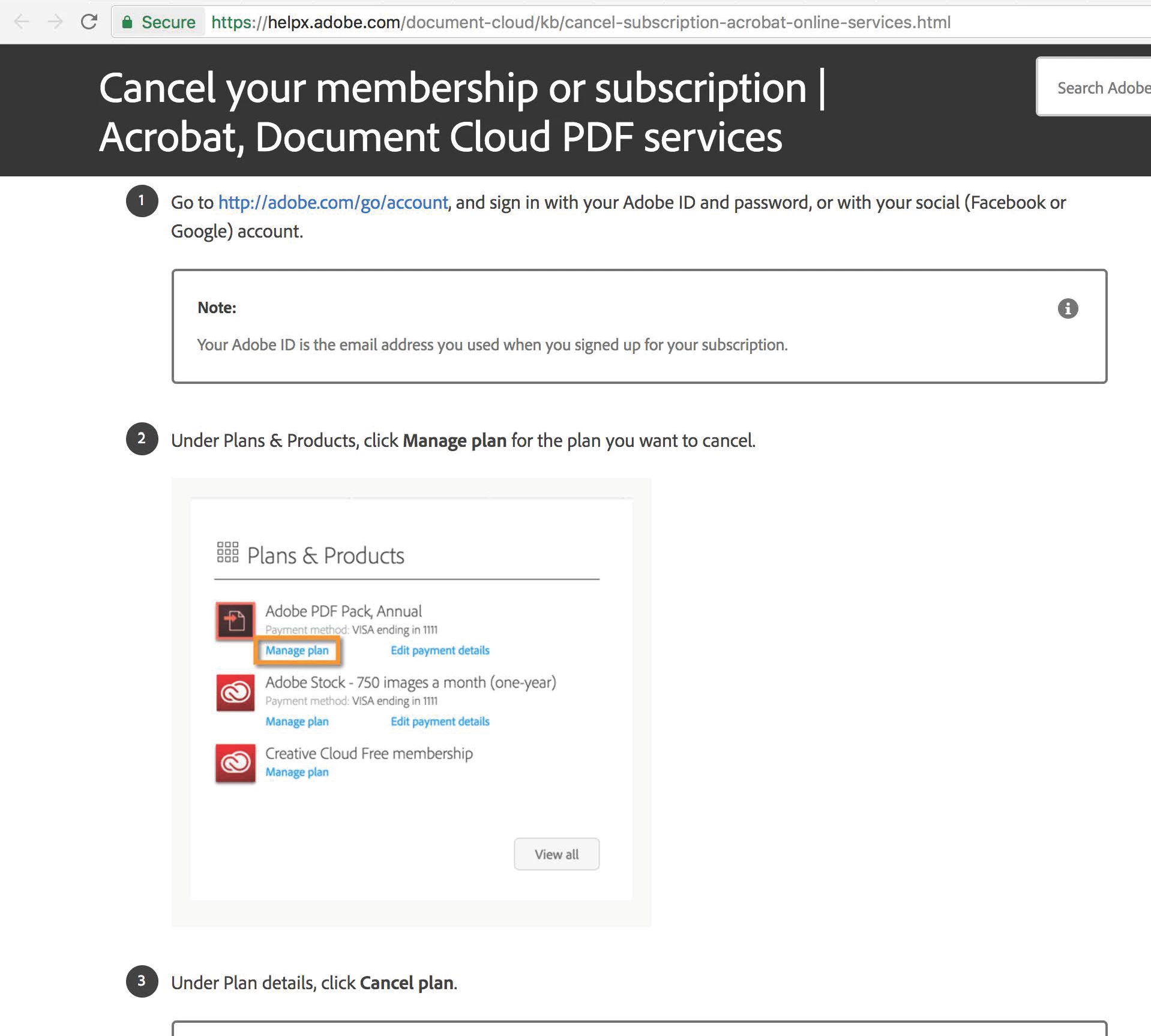
When you follow the instruction from the above link did you see below screen?

Did you purchase our services through Apple iTunes App store or Google Play store?

If so, please contact Apple or Google.

Please let me know if you have any questions.

Thank you.

Hisami

8 replies

ezeekyalt81868065
Participant
Sep 5, 2018 8:04 PM UTC

I'm having this problem too. Ever find a solution?

Translate
Participant
Apr 9, 2018 2:12 PM UTC

Also cannot cancel my month-to-month subscription as there is no option for me to on manage plans page. Cannot get through via phone and chat is always closed.

Translate
ezeekyalt81868065
Participant
Sep 5, 2018 8:04 PM UTC

I'm having this problem too. Ever find a solution?

Translate
H_SpectorCorrect answer
Adobe Employee
Aug 24, 2017 5:43 PM UTC

Hi,

When you follow the instruction from the above link did you see below screen?

Did you purchase our services through Apple iTunes App store or Google Play store?

If so, please contact Apple or Google.

Please let me know if you have any questions.

Thank you.

Hisami

Translate
Participant
Aug 25, 2017 3:03 PM UTC

Thank you for responding.

Yes, I did see the screen you just mentioned, but when I clicked 'Manage Plan', only a blank white page are shown with no option to 'cancel subscription'.

Translate
Adobe Employee
Aug 25, 2017 4:56 PM UTC

Hi mohd afiqm50139753,

Thank you for your reply.

Did you purchase the subscription through Apple iTunes app store or Google Play store?

If not, please contact our customer support to cancel your subscription (https://helpx.adobe.com/contact/support.html#support-anchor)

Thank you.

Hisami

Translate