


Participant
March 6, 2024
Answered

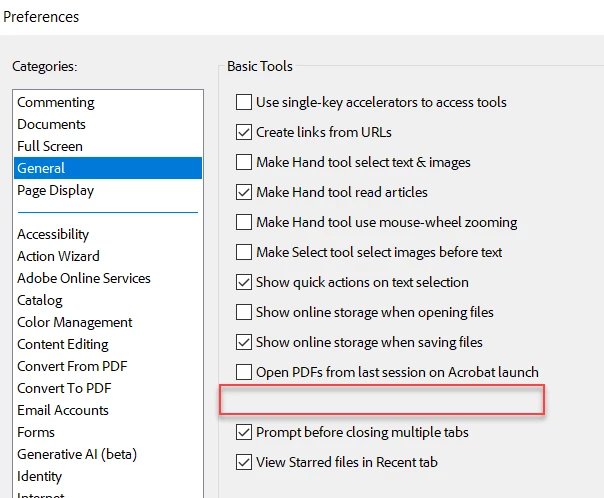
"Open documents as new tabs..." Preference missing from Adobe account Preferences>General

  • March 6, 2024
  • 2 replies
  • 589 views

We use a license that allows us to open our license in multiple environments, so I was happy to see the Preferences tab could be set under the user Adobe Account. 


I was *not* happy to see the most basic, and well-used preferences ("Open documents as new tabs..." ) was left off the list. Where the preference could be set, the menu screen is blank. Why? It's really infuriating that I have to reset this on each platform and hope it sticks!

 

This topic has been closed for replies.
Correct answer Meenakshi_Negi

Hi Darcie3560104640ie,


Thank you for sharing the information.


As mentioned, the issue has been reported. In the meantime, you may use the workaround as suggested in the message above.

Let us know if you need any help.


Thanks,

Meenakshi


Marking a reply or response “Correct” will help future users with the same issue quickly identify the correct answer.

2 replies

Meenakshi_Negi
Legend
March 11, 2024

Hi Darcie3560104640ie,


Thank you for reaching out.


Please confirm whether you are using the new version of Acrobat. If yes, then we are aware of this behavior, and it has been reported to the team. 


If you wish to pen the PDFs in a new window, you can always drag the tab in the Acrobat window out of the application. It will open the PDF in a new window. 

We are sorry about the inconvenience caused.


Thanks,

Meenakshi


Marking a reply or response “Correct” will help future users with the same issue quickly identify the correct answer.

Participant
March 25, 2024


Meenakshi_Negi
Meenakshi_NegiCorrect answer
Legend
April 11, 2024

Hi Darcie3560104640ie,


Thank you for sharing the information.


As mentioned, the issue has been reported. In the meantime, you may use the workaround as suggested in the message above.

Let us know if you need any help.


Thanks,

Meenakshi


Marking a reply or response “Correct” will help future users with the same issue quickly identify the correct answer.

Bernd Alheit
Community Expert
Community Expert
March 6, 2024

Try the forum for Adobe Acrobat.