
Question
Outlook 2016 + Adobe Send & Track + Drag'n'Drop Large PDF
We have Outlook 2016 Version 1710 (Build 8625.2127 Click-to-Run)
Whenever a large PDF or any file is dragged and dropped onto a new email,
the following pop-up window blocks Adobe Send & Track from offering to upload the file.
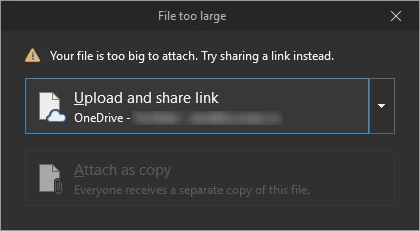
Seems like Outlook is trying to take over control of attaching large files.
As soon as you close the pop-up window nothing happens.
The file is not attached and Adobe Send & Track never offers to upload the file.
This isn't that big of a problem because the "Attache File via Adobe Send & Track" still works.
But everyone in the office is used to using drag'n'drop.
Is there a way to disable Outlook's default handling of large attachments?


 AdChoices