Answered
PDF Document to Word
How do I convert a PDF document that I have scanned onto my computer to a word document

How do I convert a PDF document that I have scanned onto my computer to a word document
Hi
You can either use Adobe Acrobat for the purpose or by using the Create pdf service to convert the file to pdf.
Using Acrobat
Please download 30 days Trial of adobe acrobat from below link : http://www.adobe.com/cfusion/tdrc/index.cfm?product=acrobat_pro&loc=us
Steps to Convert : http://www.adobe.com/in/products/acrobat/pdf-to-word-doc-converter.htm l
Using Create pdf service
Sign in to Export pdf with your Adobe ID : https://exportpdf.acrobat.com/SignIn.html
Click on the 'Export from PDF' on the right hand side and then click on 'Select Files'
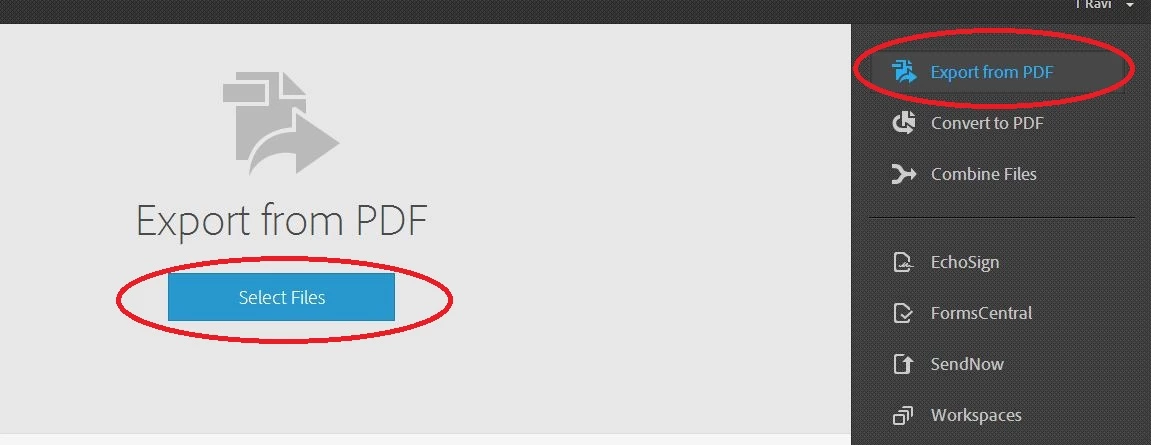
Select the pdf you wish to convert.
And then select the export options -
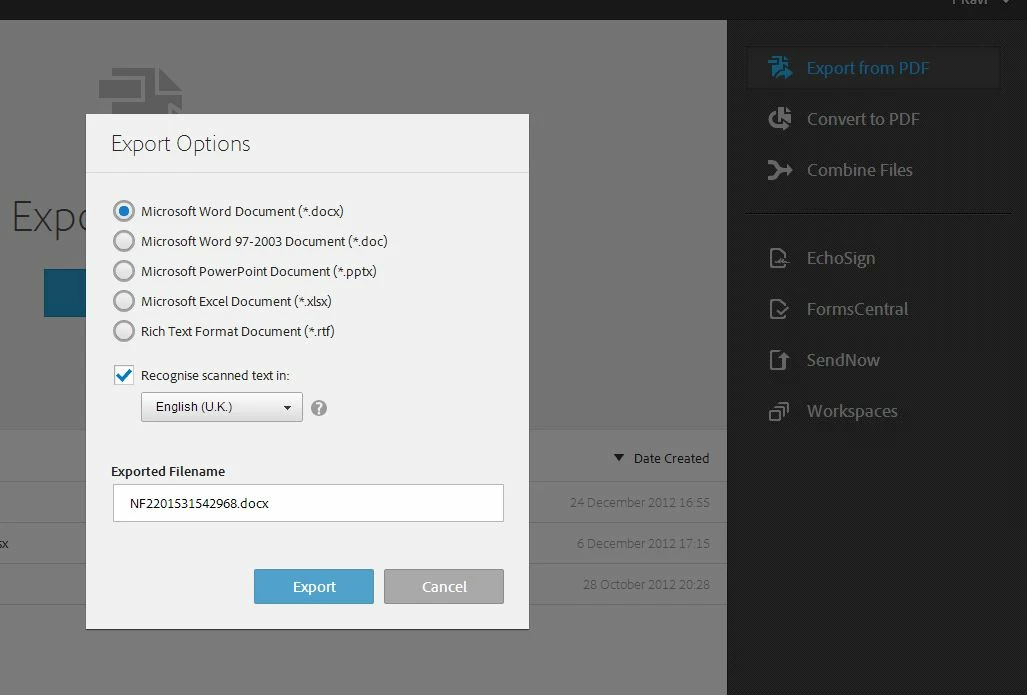
Click on 'Export' to convert the file into desired word format.
In case you face any issues try from a different browser and check.
Already have an account? Login
No account yet? Create an account
Enter your E-mail address. We'll send you an e-mail with instructions to reset your password.


 AdChoices