Participant
March 15, 2014
Answered

Privacy

  • March 15, 2014
  • 2 replies
  • 1247 views

Who can see/search my files?

How can I make files private?

Why does my phone tell me that I have to agree to make my files public in order to upload them on Adobe.com?

Thanks in advance

Correct answer pranavj

HI Alistutor,

once the files are uploaded to Acrobat, it is totally secured. No one can see/search your file. You have to make your files public before you let your user to see that perticular file.

http://forums.adobe.com/docs/DOC-1498

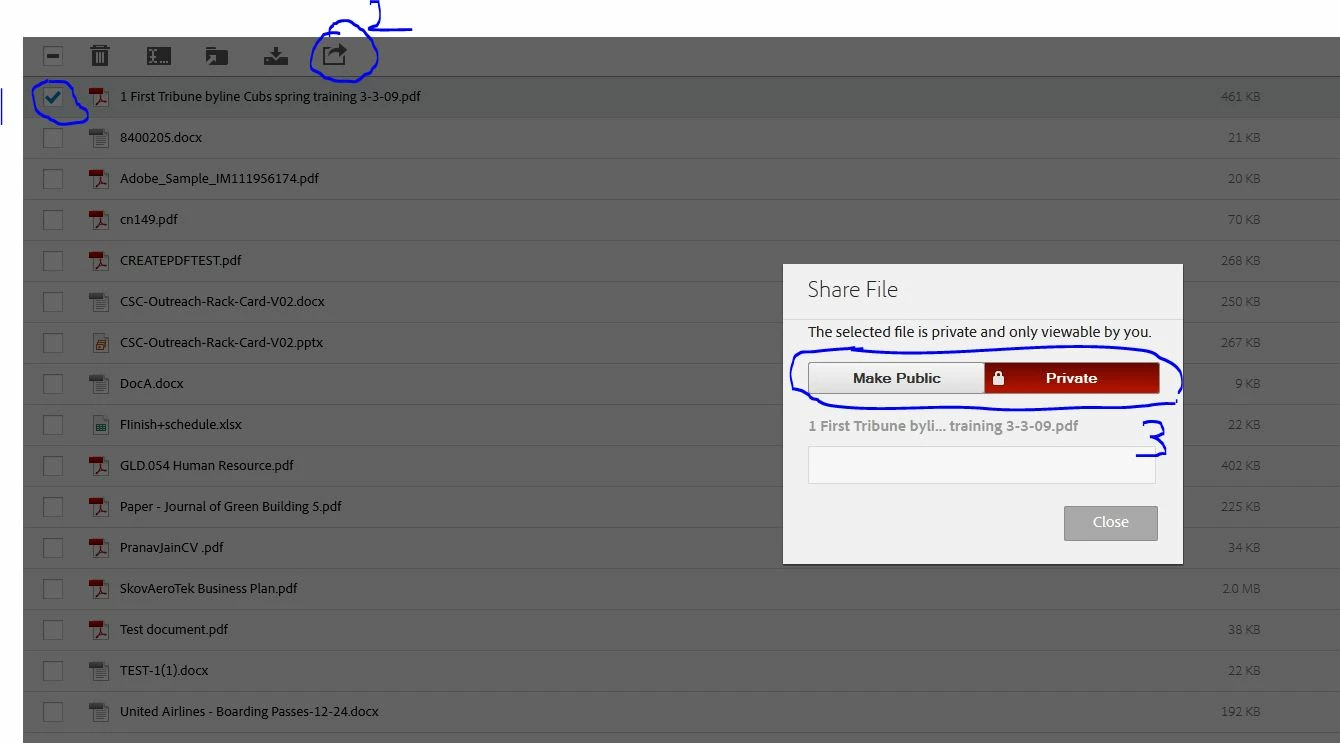
please see the below mentioned screenshot on how to make file private or Public

Steps:

  1. Select the file
  2. click Share
  3. Make file Private or Public

Let me know if you have any other question

Regards,

~Pranav

2 replies

Participant
February 6, 2020

when I use Adobe photoshop on my ipad there is no option to upload  it privately.  How do I do that?

pranavj
Adobe Employee
pranavjCorrect answer
Adobe Employee
March 17, 2014

HI Alistutor,

once the files are uploaded to Acrobat, it is totally secured. No one can see/search your file. You have to make your files public before you let your user to see that perticular file.

http://forums.adobe.com/docs/DOC-1498

please see the below mentioned screenshot on how to make file private or Public

Steps:

  1. Select the file
  2. click Share
  3. Make file Private or Public

Let me know if you have any other question

Regards,

~Pranav