


Participating Frequently
September 25, 2026
Question

Problème d'ouverture automatique extension chrome

Bonjour, 

Depuis la version 26.9.2.1 de l’extension adobe dans le navigateur chrome, l’ouverture des pdf n’est plus tout le temps automatique malgré que les paramètres soit OK. Je reproduis le problème sur plusieurs postes mais sur certain, l’ouverture automatique fonctionne encore
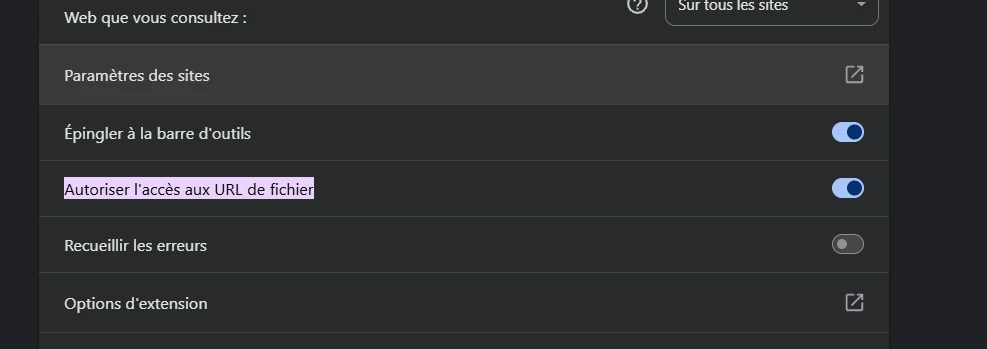
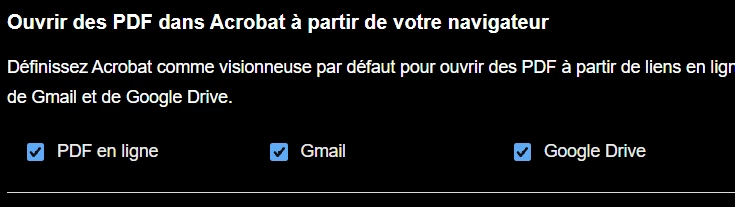
 

Le pdf s’ouvre dans le viewer chrome, le bouton est bien présent et fonctionnel pour l’ouverture dans l’extension mais celle-ci n’est plus automatique.
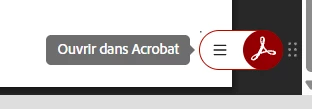
Bien entendu, l’extension a été désinstallée puis réinstallée, ça a été tester dans plusieurs profil chrome.

Dans mon cas, le pdf s’affiche depuis une application web interne. Si j’ouvre un pdf depuis une recherche google ou depuis le local de mon pc, l’extension s’ouvre automatiquement.


    13 replies

    Participating Frequently
    September 28, 2026

     Bonjour, 

    Ci-joint, la capture avec l’url. 

    On constate bien que l’extension ne s’ouvre pas, c’est uniquement la visionneuse. Si je clique sur le bouton en bas a droite, l’extension s’ouvre correctement, le seul problème que je rencontre c’est que ce n’est plus automatique sur plusieurs de mes postes.

    Le PDF est affiché directement dans la fenêtre. 


    Translate
    Meenakshi Negi
    Community Manager
    Community Manager
    September 28, 2026

    Hi excited_Sunshine36b2,


    Thank you for sharing the screenshots. 

    Please allow us some time to check with the product team and we will update you once we have the information on this.


    Thanks,

    Meenakshi

    Translate
    Participating Frequently
    October 8, 2026

    Bonjour, avez vous eu un retour?

    Translate
    Participating Frequently
    September 28, 2026

    Bonjour, 

    Ci-joint, la capture avec l’url. 

    On constate bien que l’extension ne s’ouvre pas, c’est uniquement la visionneuse. Si je clique sur le bouton en bas a droite, l’extension s’ouvre correctement, le seul problème que je rencontre c’est que ce n’est plus automatique sur plusieurs de mes postes.

    Le PDF est affiché directement dans la fenêtre. 


    Translate
    Meenakshi Negi
    Community Manager
    Community Manager
    September 25, 2026

    Hi excited_Sunshine36b2,


    Thank you for reaching out, and sorry to hear that you are experiencing an issue.

    To help us investigate this behavior further, please provide the following information:


    • A short video demonstrating the steps you are taking.

    • The Acrobat extension version number you are using.

    • Browser version.

    • The operating system on your machine.

    • Please let us know whether the issue occurs with PDFs from a specific location or with all files.

    Once we have this information, we can further assess the problem.

    We look forward to your response.


    Thanks,

    Meenakshi

    Translate
    Participating Frequently
    September 28, 2026

    Bonjour, 

    Windows 11 25h2 mais ça a été reproduit sur d’autre version

    Chrome 153 et 154.

    Adobe extension 26.9.2.1

    je ne peux pas prendre une vidéo du problème car il y a des données confidentielle.

    Sur la capture ci-dessous, on voit que l’affichage se fait dans le viewer chrome et que celui-ci propose d’ouvrir l’extension. C’est un site interne a mon entreprise.

    Sur des sites extenes par exemple, ça fonctionne, l’extension s’ouvre bien directement comme montré dans la vidéo. 

    Sur plusieurs postes, ça fonctionne bien, sur d’autre l’ouverture n’est pas automatique. Les paramètres sont identiques que ce soit au niveau chrome ou de l’extension adobe.


    Translate
    BaniVerma
    Community Manager
    Community Manager
    September 28, 2026

    Hi @excited_Sunshine36b2,


    Thank you for sharing the video. It confirms that the Acrobat extension opens the PDF correctly from the external website. The address bar shows the PDF loading through the Acrobat Chrome extension, while the issue you reported occurs with PDFs opened from your company’s internal website.


    Since the internal content is confidential, there is no need to share the document or the website address. To help us compare the working and affected workflows, could you share a similarly redacted screenshot of the address bar when an internal PDF is still open in Chrome’s viewer? Please conceal the company domain, document name, and any other confidential information.

    It would also help to know whether the internal PDF opens in a new browser tab or remains embedded within the application page.


    Please share these details, and we’ll take it from there.

    Thanks,
    ^BS

    Translate