


Participant
February 14, 2024
Question

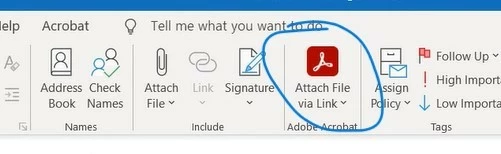
Question: Send attachments using Adobe cloud storage

  • February 14, 2024
  • 1 reply
  • 317 views

Hi, I have installed (and reinstalled) Adobe to my PC. I have checked all the settings in outlook icluding Add-ins and Acrobat Settings in a new message window. Everything looks fine there. Still I don't get the "send attachments using Adobe cloud storage" option.  I have one of the latest Windows and my Outlook is up to date and so is the Adobe. I use Adobe for Enterprise. This otion works fine for my colleagues. Any ideas? Thanks

In the picture bellow visualization of what I am missing. 
This topic has been closed for replies.

1 reply

Meenakshi_Negi
Legend
February 28, 2024

Hi Anete35445628pmj5,


Thank you for reaching out.


If the add-in is still not available, try once reinstalling the application using the steps suggested in the following help document:

-Remove the application and run the cleaner tool (https://adobe.ly/48wIJVn).
-Reboot the machine
-Install Adobe Acrobat from the following page: https://adobe.ly/3wBecZp.


If the above steps do not work, try adding the add-in manually. Let us know how it goes.


Thanks,

Meenakshi