SlowRambler
Participant
March 29, 2017
Answered

Running Windows Xp pdf files will not upload to Cloud

  • March 29, 2017
  • 1 reply
  • 933 views

If I attempt to upload a pdf process starts then I receive error message 'Cannot sign in to your account'

Problem is I am already signed in so process should be seamless

I have tried signing out and signing in again....same error message

I have a number of pdf's stored in the Cloud and can access them all so I have not previously had this problem

Anyone in the community seen this behaviour before ?

Is there a fix ?

I hope so

Keith
This topic has been closed for replies.
Correct answer Adorobat

Thanks for giving the information.

As you have mentioned, It might be because of the compatibility between the Operating System and the version of Reader installed on your machine.

You might try upgrading your Operating System.

In the meantime, you may try uploading your document to Document Cloud using this link:

https://cloud.acrobat.com/folder/d7c0d6ee-1c89-4da1-820a-aad7c9f1dadd

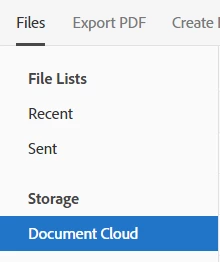
1- Click Document Cloud (in the left-hand corner of the screen).

2- Click Cloud icon (in the right-hand corner of the screen).

3- Select the file to upload.

Below are the screenshots:

Let me know if you have any questions about this.

Shivam

1 reply

Adorobat
Community Manager
Community Manager
April 3, 2017

Hi SlowRambler,

Could you please try the steps suggested in the following link?

Having problems signing in?

Are you trying to upload pdf files in Acrobat Reader or using this link: https://cloud.acrobat.com/  in a Web Browser?

Please keep us posted with the results.

Thanks!

Shivam

SlowRambler
Participant
April 3, 2017

Greeting from England Shivam

You have misunderstood my request for help

I can sign in to my Adobe Cloud account without any problem

Please read through this description and be patient

If I have a pdf file open it offers me the option to upload the file to my cloud account (right hand side of the page button labelled save)

I have used the feature frequently in the past and can see all the files I have previously uploaded

Now when I try the software launches but before completion up comes the error message 'an error has occurred' try again

The top right hand side of the page confirms I am correctly signed in

The 'problem' might be in Windows Xp which is no longer supported

Please consider and suggest a fix

Keith

Sent from Outlook<http://aka.ms/weboutlook>

Adorobat
Community Manager
AdorobatCommunity ManagerCorrect answer
Community Manager
April 3, 2017

Thanks for giving the information.

As you have mentioned, It might be because of the compatibility between the Operating System and the version of Reader installed on your machine.

You might try upgrading your Operating System.

In the meantime, you may try uploading your document to Document Cloud using this link:

https://cloud.acrobat.com/folder/d7c0d6ee-1c89-4da1-820a-aad7c9f1dadd

1- Click Document Cloud (in the left-hand corner of the screen).

2- Click Cloud icon (in the right-hand corner of the screen).

3- Select the file to upload.

Below are the screenshots:

Let me know if you have any questions about this.

Shivam