Participant
November 1, 2021
Answered

Sign PDF in Document Cloud

  • November 1, 2021
  • 1 reply
  • 524 views

Hello,


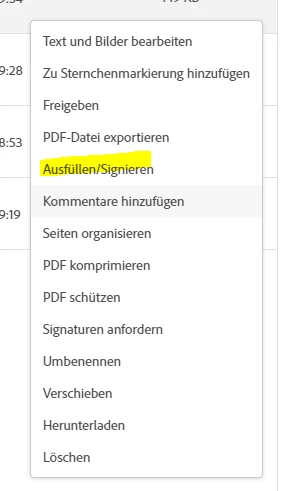
I would like to sign a PDF-File in the Adobe Document Cloud. If I klick on the sign-button a loading-animation appears which doesn't finish. I'm not using a license and I don't have a subscription. But it should be possible to sign PDF's without that.


I'm clicking this Button:


This topic has been closed for replies.
Correct answer Harsh Vardhan Pareek

Hi,


Hope you are doing well.

As per the issue description that you are unable to sign a PDF.  Try few troubleshooting steps mentioned below:

  1.  Copy the link from where you are requested to sign and paste it on a different browser and try to sign.
  2. If this works on the other browser then clear the cache and cookies of the former browser and try again.
  3.  If you are opening your mail inbox on a mail application then try to open the email on a browser or vice versa.


Let us know if that helps.


Thanks,

Harsh

1 reply

Harsh Vardhan Pareek
Harsh Vardhan PareekCorrect answer
Participating Frequently
November 10, 2021

Hi,


Hope you are doing well.

As per the issue description that you are unable to sign a PDF.  Try few troubleshooting steps mentioned below:

  1.  Copy the link from where you are requested to sign and paste it on a different browser and try to sign.
  2. If this works on the other browser then clear the cache and cookies of the former browser and try again.
  3.  If you are opening your mail inbox on a mail application then try to open the email on a browser or vice versa.


Let us know if that helps.


Thanks,

Harsh