


Participant
October 8, 2023
Answered

Signature feature doesn't work after upgrade to latest version

  • October 8, 2023
  • 1 reply
  • 983 views

After upgrade to the latest version,the Fill and Sign feature stops working.
I can't add Fill and Sign (Sign yourself) tool to the tool bar, the tool button shows on the pop up window when I try to custermise it, but the "save" button is greyed out, and it never shows up  the left tool bar. 
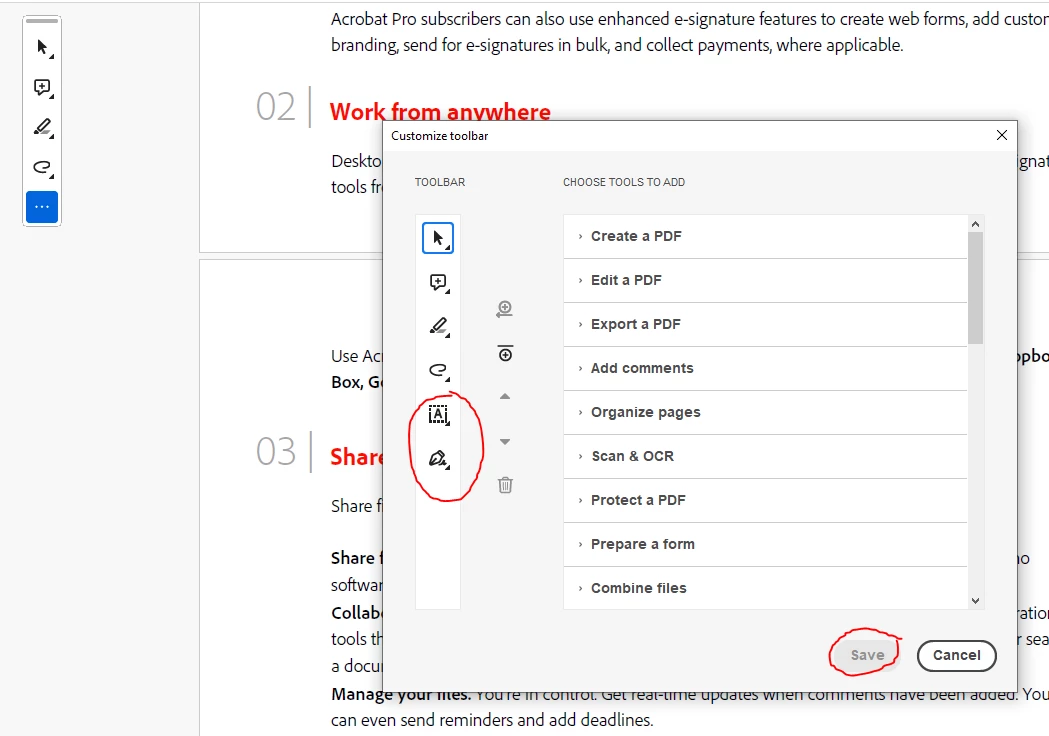
Please advice on how to solve this bug.
I've reinstall the Acrobat 3 times with no luck, I'm using windows 10 and I also hve the subscribiton for the Adobe createive suit.

Many thanks

This topic has been closed for replies.
Correct answer Meenakshi Negi

Hi Beidi23716274k81r,


Thank you for reaching out, and sorry about the delay in response.


The fill & Sign feature should be available in the quick tool panel by default. Please let us know if you removed the feature. 

Try repairing the installation. In Acrobat, go to Menu > Help > Repair Installation.

If the issue persists, try reinstalling the application using the following steps:
-Remove the application and run the cleaner tool (https://www.adobe.com/devnet-docs/acrobatetk/tools/Labs/cleaner.html).
-Reboot the machine
-Install Adobe Acrobat from the following page: https://helpx.adobe.com/acrobat/kb/acrobat-dc-downloads.html


If the above steps don't help, share the Acrobat and OS version numbers.


Thanks,

Meenakshi

1 reply

Meenakshi Negi
Community Manager
Meenakshi NegiCommunity ManagerCorrect answer
Community Manager
October 16, 2023

Hi Beidi23716274k81r,


Thank you for reaching out, and sorry about the delay in response.


The fill & Sign feature should be available in the quick tool panel by default. Please let us know if you removed the feature. 

Try repairing the installation. In Acrobat, go to Menu > Help > Repair Installation.

If the issue persists, try reinstalling the application using the following steps:
-Remove the application and run the cleaner tool (https://www.adobe.com/devnet-docs/acrobatetk/tools/Labs/cleaner.html).
-Reboot the machine
-Install Adobe Acrobat from the following page: https://helpx.adobe.com/acrobat/kb/acrobat-dc-downloads.html


If the above steps don't help, share the Acrobat and OS version numbers.


Thanks,

Meenakshi

Participant
October 16, 2023

Hello Meenakshi

Thank you I tried the Reair installation which didn't work...
So I uninstall it and ran thecleaner tool.
The Acrobat from the 2nd link you provided works perfectlly this time!
The previous verison I download straight from Adobe creative suit launcher, it was giving me the problem, I guess I will not use that version then.

Thanks again!

Meenakshi Negi
Community Manager
Community Manager
October 17, 2023

Hi Beidi23716274k81r,


Thank you for letting us know. Glad to know that the issue is resolved.

Let us know if we can be of any further help.


-Meenakshi