babis ananiadis
Participant
March 30, 2015
Answered

there is a limit of MB for uploading files?

  • March 30, 2015
  • 2 replies
  • 1441 views

I try to upload files that are 30 Mb or more and i cant - is there a limit?

This topic has been closed for replies.
Correct answer Sara_Forsberg

Dear Rahul

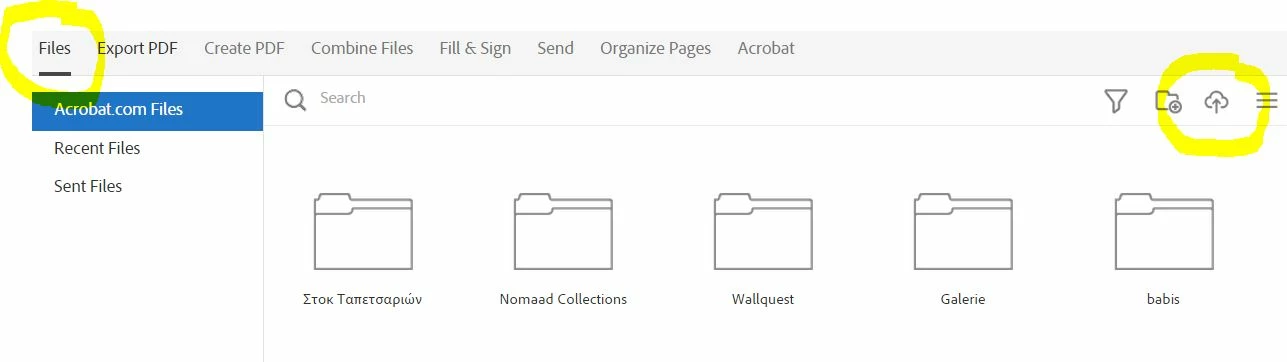
I use at the first tab "FILES" the button upload. I dont have problem with files smaller than 15 MB but with bigger files i wait to finish the uploading and then i cant find the file.

Thanks in advance

Best regards

Babis


Hi Babis,


If you're not receiving an error during upload, it may be that the file list just isn't being updated. Have you tried clearing the browser cache, and then logging back in to https://cloud.acrobat.com?


Best,

Sara


2 replies

Adobe Employee
March 30, 2015

Hi Babis.

There is no specific limit to the maximum size. However, network errors can be more likely on a long upload.

Can you explain in more detail exactly what you're seeing? What do you see after the progress bar gets all the way?

Participant
December 16, 2022

I have a lot of documents that I must send today and I get a note saying (I reached my limit.

AkanchhaS8194121
Legend
December 21, 2022

Hi @Linda27603715ce7u 


We do have daily Share limits for all users. Depending on the account type, the limit is defined. 

The limits are not on files but on the number of recipients with whom files can be shared.

It seems that you might have exhausted the daily limit of sharing a link to the file.


Thanks,

Akanchha 

RahulTyagi_
Participating Frequently
March 30, 2015

Hi Babis,

Which Adobe Online service are you using? Acrobat.com cloud storage or Adobe send or Uploading file for conversion?

Are you getting any error message when you try uploading files larger than 30MB?

Did you tried uploading the files using a different network?

Regards,
Rahul

babis ananiadis
Participant
March 30, 2015

Hi Rahul,

i use cloud.acrobat.com (i buy pdf pack) and when i try to upload a filoe 45MB i wait for uploading and when the upload bar finished i couldn't find thew file.

Regards

Babis

RahulTyagi_
Participating Frequently
March 30, 2015

Hi Babis,

I would be able to assist you on this issue if you let me know that what exactly are you trying to achieve with that file?

There are eight options available to you on the top bar, when you open this URL (cloud.acrobat.com), On which tab are you working upon?

I would still recommend you to check your 'files' tab.

Regards,

Rahul