


Participant
November 24, 2022
Answered

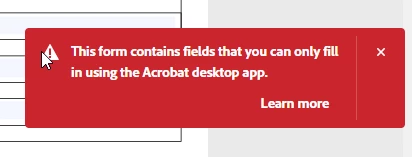
This form contains fields that you can only fill in using the Acrobat desktop app.

  • November 24, 2022
  • 2 replies
  • 4604 views

Two questions:


Is there a workaround if Adobe reader online or the chrome extension says "This form contains fields that you can only fill in using the Acrobat desktop app"?


What could cause this error?


This topic has been closed for replies.
Correct answer tmfisher1969

I got a call about this error today.  The user had opened a PDF form within Google Chrome - then tried to sign it.  I asked him to download the form, then open in Adobe Acrobat.  All worked well.

2 replies

tmfisher1969Correct answer
Participant
January 12, 2023

I got a call about this error today.  The user had opened a PDF form within Google Chrome - then tried to sign it.  I asked him to download the form, then open in Adobe Acrobat.  All worked well.

Participant
December 15, 2023

What to do if you are not on Windows or Mac? What to do if you are on Linux or Chrome OS?

Bernd Alheit
Community Expert
Community Expert
December 16, 2023

Then you can't fill the form.

Bernd Alheit
Community Expert
Community Expert
November 24, 2022

This is not a error. It is a information.

How have you created the form?

Participant
November 24, 2022

I didn't create it. It's somebody elses file.

Bernd Alheit
Community Expert
Community Expert
November 24, 2022

May be that is a XFA form.