Participant
January 3, 2023
Answered

Unable to combine PDFs . Error: Page extraction not allowed

  • January 3, 2023
  • 1 reply
  • 5883 views

I am trying to combine PDFs that I did not create using Adobe Acrobat Online.  Each time I try this I get an error message telling me that I cannot combine PDFs containing page extraction.  I am not sure what page extraction is but I seem to get the error message when I try to combine PDFs created by another user.  When I combine PDFs I have created the files are combined satisfactorily. Is there a work around that would enable me to combine files created by others? 

Correct answer try67

It depends on the exact command that was used in Word to convert to PDF. If they used the "Save As Adobe PDF" command then there's a Protect PDF check-box that needs to be unticked:


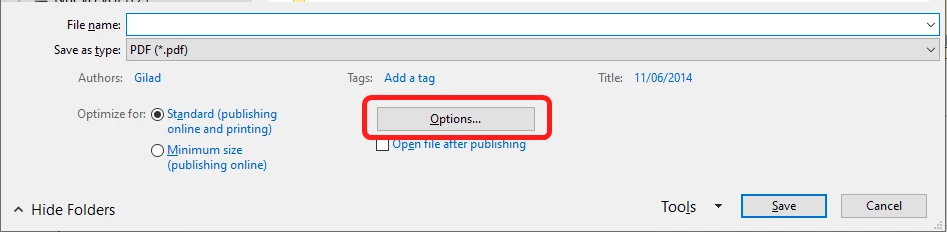
If they used the "Save As" command and then selected PDF as the output format they need to click on More Options:


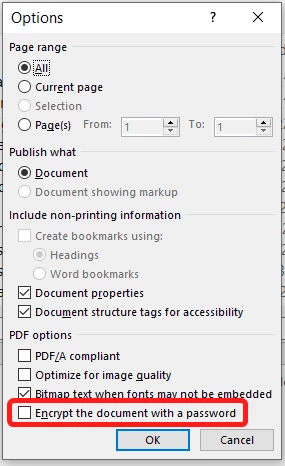
And then on Options:


And then tick-off "Encrypt the document with a password" check-box:


1 reply

Bernd Alheit
Community Expert
Community Expert
January 5, 2023

You will get this message when the files are protected.

Participant
January 5, 2023

Thanks @Bernd Alheit it looks as though the PDFs I am trying to combine were created in Microsoft Word and the default setting for PDFs exported from Word includes Document Assembly not allowed.  I can't see a way in which the Microsoft Word user can change the default setting and so it looks as though the only way forward is for me to persuade the originator to combine the documents before they send them to me.

Meenakshi Negi
Legend
January 6, 2023

Hi Greg276613239au7,


Thank you for reaching out.


Adding to Bernd Alheit suggestion.


As you experience the issue when converting the PDFs created in MS Word, you may get the Word files directly from them and then combine those files into a single PDF.


Let us know if we can be of any help. 


Thanks,

Meenakshi