April 8, 2015
Answered

Unable to print job application from Adobe DC

  • April 8, 2015
  • 6 replies
  • 951 views

I just filled out an entire job application in Adobe cloud (fill & sign)and it won't print.

I am afraid to try anything for fear of losing all of the info.

What do I do next???

This topic has been closed for replies.
Correct answer Josh_Corey

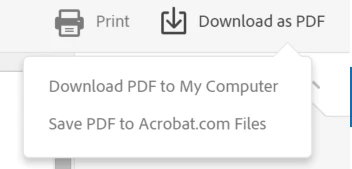
To Print the form "Download as PDF" and choose "Download PDF to my Computer" or simply press "Print" - both of those will download the PDF to your Downloads folder:

then open the PDF in the free Adobe Reader DC and print from there Adobe Reader.

Thanks,

Josh

6 replies

Josh_CoreyCorrect answer
Inspiring
April 8, 2015

To Print the form "Download as PDF" and choose "Download PDF to my Computer" or simply press "Print" - both of those will download the PDF to your Downloads folder:

then open the PDF in the free Adobe Reader DC and print from there Adobe Reader.

Thanks,

Josh

April 8, 2015

THANK YOU for your prompt response.   It worked!

I know my question was super simple but I have been working on this for hours and my head hurts.

Inspiring
April 8, 2015

I'm sorry it was not clearer how to accomplish printing, we're reviewing the workflow to see what can be improved.

Josh