victoriar38804517
Participant
September 13, 2016
Answered

Unable to upload pdf to Cloud

  • September 13, 2016
  • 1 reply
  • 960 views

I am connected to the internet but in Adobe it says I am not and I can therefore not send a PDF to the cloud. I am doing this through Adobe, not a web browser, so to my knowledge it shouldn't be linked to a browser. I am using Adobe DC.

This topic has been closed for replies.
Correct answer Adorobat

Hi victoriar38804517,

Try to perform following steps:

1- Sign out and close the application, launch it again and sign in and check if it is still showing the same message.

2- If that doesn't work,  try to disable your LAN/Wi-FI connection and enable it again.

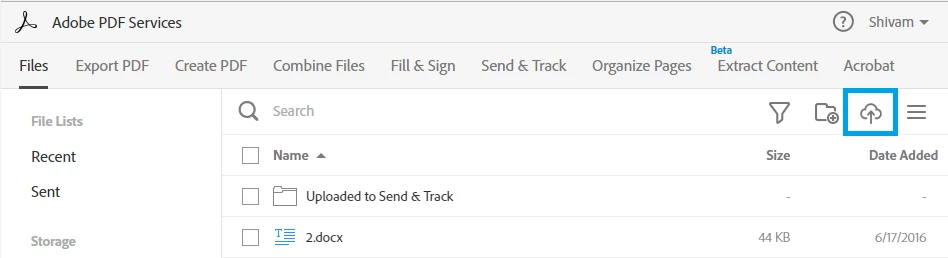
You can upload pdf file to the cloud by visiting this URL: https://cloud.acrobat.com/ , copy and paste this URL in the Web Browser like Google Chrome, select Document Cloud, and drag and drop the file or click on  Cloud icon in the top right corner of the screen.

Below are the screenshots:

Thank You,

Shivam

1 reply

Adorobat
AdorobatCorrect answer
Participating Frequently
September 16, 2016

Hi victoriar38804517,

Try to perform following steps:

1- Sign out and close the application, launch it again and sign in and check if it is still showing the same message.

2- If that doesn't work,  try to disable your LAN/Wi-FI connection and enable it again.

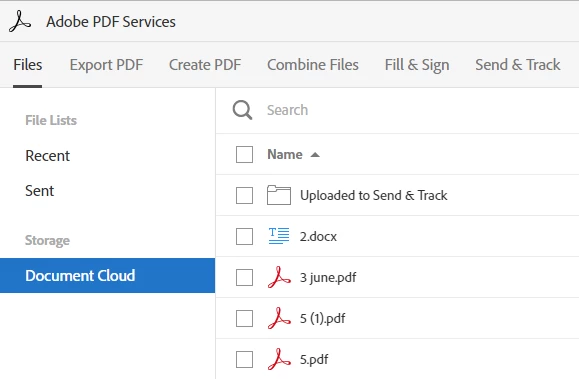
You can upload pdf file to the cloud by visiting this URL: https://cloud.acrobat.com/ , copy and paste this URL in the Web Browser like Google Chrome, select Document Cloud, and drag and drop the file or click on  Cloud icon in the top right corner of the screen.

Below are the screenshots:
Thank You,

Shivam