Participant
Jun 23, 2017 3:32 PM UTC
Answered

Why can I not open my document cloud?

I purchased the Adobe PDF Pack and when I open my Adobe Acrobat Reader DC, I cannot click on my document cloud.  Can someone help me out with this?  I haven't been able to open it for a while and I thought it was because I was using the free version of this program and so I purchased the service, but I still cannot open my DC.  I went online and tried it that was as well and my DC will open, but it will not pull up my document.  I get a message on the screen saying "Please wait".

[Moved from the non-technical LOUNGE Forum to an actual Program forum... Mod]

[Here is the list of all Adobe forums... https://forums.adobe.com/welcome]

    This topic is closed to new replies. Start a new post to keep the conversation going.
    AkanchhaS8194121
    AkanchhaS8194121Correct answer
    Legend
    Jun 24, 2017 7:19 AM UTC

    Hi Anthonya65465361,

    As you said that the only Document Cloud storage is not opening, so could you check couple of things as suggested below and see if that works?

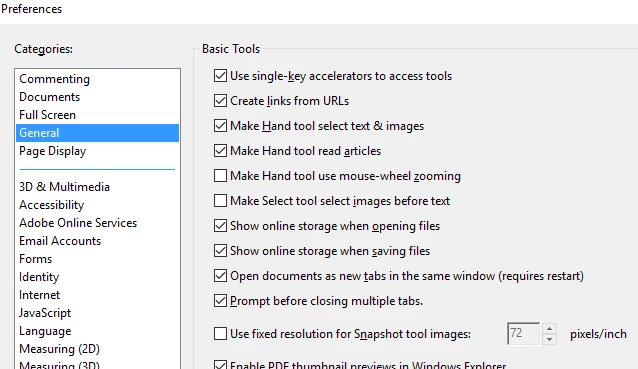
    • Check the preferences settings of the application Go to Edit>Preferences>General. Check"Online storage when opening files"

    If that is checked, then temporary disable if any internet security software you have installed.

    Let us know the update on this.

    Regards,

    Akanchha

    1 reply

    AkanchhaS8194121
    AkanchhaS8194121Correct answer
    Legend
    Jun 24, 2017 7:19 AM UTC

    Hi Anthonya65465361,

    As you said that the only Document Cloud storage is not opening, so could you check couple of things as suggested below and see if that works?

    • Check the preferences settings of the application Go to Edit>Preferences>General. Check"Online storage when opening files"

    If that is checked, then temporary disable if any internet security software you have installed.

    Let us know the update on this.

    Regards,

    Akanchha

    Translate