Participant
October 17, 2025
Answered

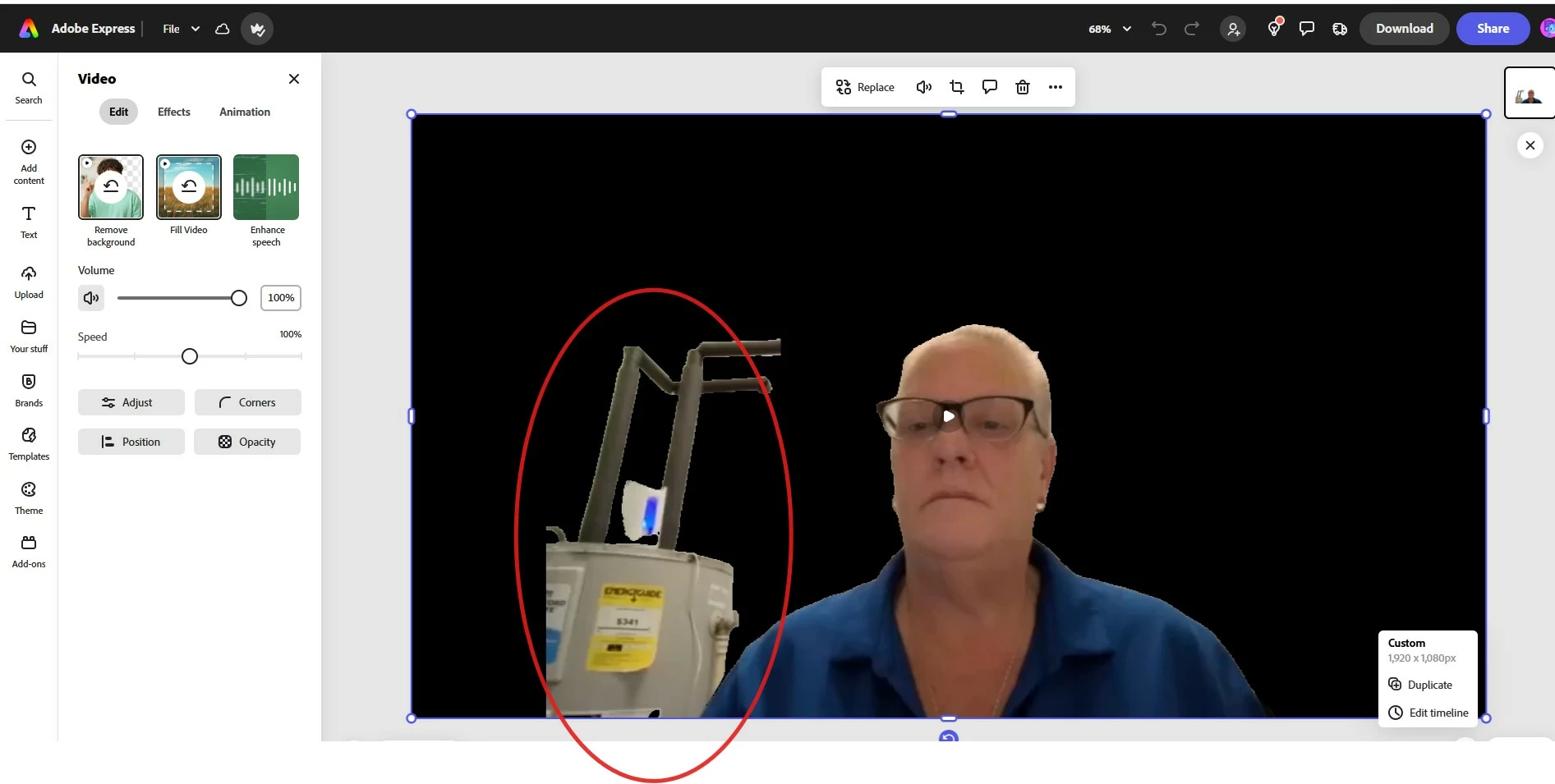
Adobe Express 2025 did not remove all the background of my video

  • October 17, 2025
  • 2 replies
  • 221 views

Adobe Express did not remove all the background of my video. I did not see an option to manually remove and object or to retry removing the background. How can I resolve this issue? 

Correct answer David__B

Hi @christy_4373


Sorry to hear about your frustration with this. It looks like the app was struggling to differentiate the subject (you in this case) and the water heater from the background. The background remover for images in Express allows you to edit the content after the removal, but unfortunately, not for videos. My best recommendation would be to re-record the video from a different angle or in a different setting with a different background. Try to choose a background as simplistic as possible, such as a solid wall or a uniform background of some type. Maybe test a few short clips too, just to ensure the removal is successful, before recording your longer video.

Sorry to have to share the limitation,

Best,

Dave

2 replies

Participant
October 20, 2025
Hello,

Thank you, for your response and assistance.

Christy Franklin
Learning Experience Designer
[https://cdn.gifo.wisestamp.com/s/rfp3/001F3d/26/trans.png] 949-629-0745<949-629-0745> [https://cdn.gifo.wisestamp.com/s/rfem1/001F3d/26/trans.png] christy.franklin@westportproperties.net
[https://cdn.gifo.wisestamp.com/s/rfa2/001F3d/26/trans.png] 660 Newport Center Dr. Suite 1450 Newport Beach, CA 92660<>
[https://cdn.gifo.wisestamp.com/s/rfw1/001F3d/26/trans.png] westportproperties.net<>
[https://d36urhup7zbd7q.cloudfront.net/u/wYe9EpdnKb6/413d0fd3-e542-4e50-9301-29c9545a0770__1040x134__.png]<>

[__tpx__]
David__B
Adobe Employee
David__BCorrect answer
Adobe Employee
October 17, 2025

Hi @christy_4373


Sorry to hear about your frustration with this. It looks like the app was struggling to differentiate the subject (you in this case) and the water heater from the background. The background remover for images in Express allows you to edit the content after the removal, but unfortunately, not for videos. My best recommendation would be to re-record the video from a different angle or in a different setting with a different background. Try to choose a background as simplistic as possible, such as a solid wall or a uniform background of some type. Maybe test a few short clips too, just to ensure the removal is successful, before recording your longer video.

Sorry to have to share the limitation,

Best,

Dave

Participant
November 14, 2025

It might be helpful if you can point to things that are background and foreground. I can't imagine why it would assume my arm is background when it's clearly moving in front. If i had a way to mark it by color, as a keep,

I could help it understand what it did wrong.

Tarun Saini
Community Manager
Community Manager
November 14, 2025

Hi there,


Thanks for reaching out! We're sorry to hear about this. Is it happening with all images or just with this one? Did you try using another browser to check if that helps? 


Also, try clearing the browser's cache and cookies, and restarting the browser and try again. For more information on how to clear cache and cookies check this link- https://adobe.ly/4a5ipUF and how to use incognito mode- https://adobe.ly/4a2UzZV 


Regards,

Tarun