


Inspiring
July 29, 2025
Answered

All Design Assets in Adobe Express have Exclamation Marks in Red Triangles

  • July 29, 2025
  • 14 replies
  • 673 views

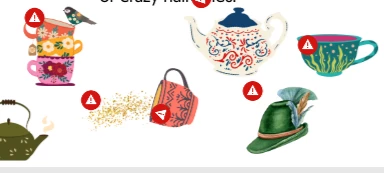
Hello, I am having a problem with using the design assets in Adobe Express. Everytime I place down an image it eventually has an exclamation mark in a red triangle hovering above it. I've tried increasing the scale, decreasing the scale, deleting and readding. Nothing seems to work and there is no additional information provided in the application. Any help would be greatly appreciated. 


I do have a premium account and this problem happens with the free assets as well. When I try to download the file to print it says "We're working on your file. It'll be ready to download soon". It has said this for over a week now.                                       
Correct answer lauren_9184

I am on a work network and our IT preson had to go in and mess with a bunch of settings until it worked. Unfortunately I don't know what he had to change in order to get it to work. 

14 replies

Adobe Employee
July 29, 2025

Thanks for confiming, @lauren_9184. I do see related errors in your logs (failure to download the full resolution Stock images/assets). I assume this started happening recently? Did something about your network change, or did you install a new browser extension, ad-blocker etc.?


Abhi G

Inspiring
July 29, 2025
 

@Abhi.G @ ADBE Everything except text. Everything in the Elements tab when added to any project, has this problem. 

Adobe Employee
July 29, 2025

Hi @lauren_9184 


Is this specifically happening for design assets? What about other Stock assets from the Media panel?


Thanks

Abhi G

Inspiring
July 29, 2025

Please ignore my inability to shape...I had to pick up friends from the airport at 1:30am and it has been a long day.