



Liliana1234
Participant
August 3, 2026
Question

Audio recordings stuck on loading in Adobe Express, cannot edit or play

  • August 3, 2026
  • 2 replies
  • 39 views


I am having an issue with audio recordings in Adobe Express and hope someone here can help.

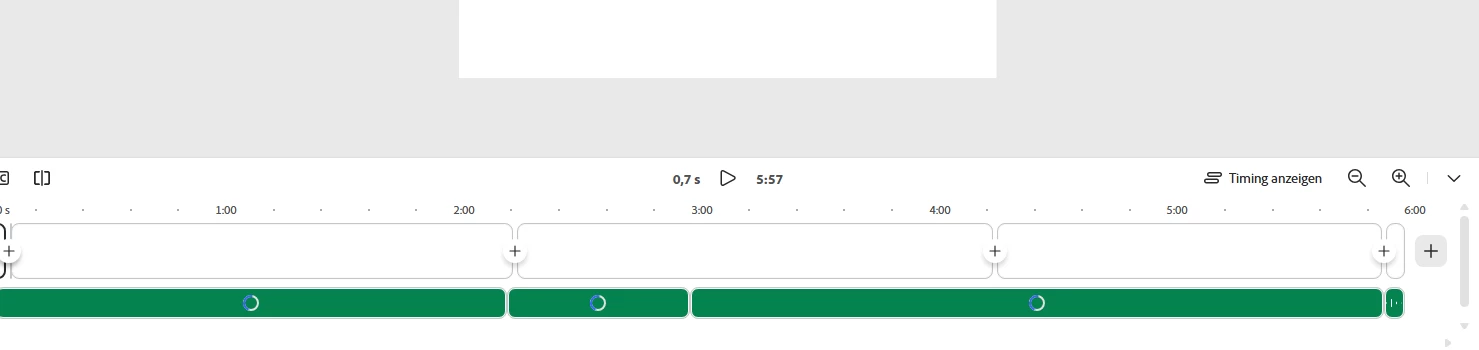
I recorded some audio directly within Adobe Express, but the files are stuck in a perpetual loading state. I can see the loading spinner, but the audio never finishes processing 

The main problems are:

  • I cannot play the audio back within my project 
  • I cannot edit or adjust the volume/timing of the audio tracks.

  • The files just keep showing the loading animation indefinitely 
     

  •  

    2 replies

    talented_speakere773
    Participant
    August 25, 2026

    Hi ​@Liliana1234 - I’m an Express engineer and started looking into this issue. I see you reported it a few weeks ago. Are you still blocked or were you able to find a workaround/start a new project and successfully add your recorded audio?

    Do you remember what steps you took that got you to this state? I’d like to see if I can reproduce the problem.

    Rose DV
    Community Manager
    Community Manager
    August 5, 2026

    Hi ​@Liliana1234, thanks for the clear breakdown of what's happening and the screenshot, that timeline view with the loading spinners is really helpful.


    A few things that would help us dig into this further:

    • Which browser and device are you using?

    • Roughly how long is each audio recording, and how many do you have in this project?

    • Does this happen with every recording, or only some?

    • Could you try refreshing the page or reopening the project in an incognito browser (or different browser altogether) to see if it changes anything?

    A HAR file captured while this happens would also help our team dig in. Here's a guide on generating one: https://adobe.ly/4yPx0zA

    To help our team take a closer look, would you be willing to share the project too?


    → Duplicate the project first, so your original stays untouched
    → Click Share in the top right
    → Under General access, change it from Restricted to Anyone with the link
    → Set the permission to Can edit
    → Send the link via DM

    Rose