


Participant
May 22, 2025
Question

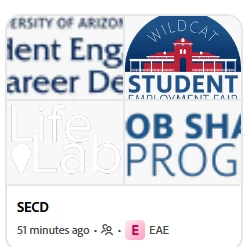
Brand is now specific to a project? It's intended to be the overall brand.

  • May 22, 2025
  • 1 reply
  • 130 views

I created a brand for our organization that I want to apply to various projects. The brand is now embedded with the project, and I can't "move" it.  When I "copy" it to other projects, it creates duplicates.  How can I remove the project label from this brand? (See "E" in pink box below) means the "SECD" brand is aligned with project "EAE".
 

1 reply

Community Manager
May 23, 2025

Hi @SKB_48,


Thanks for raising this concern, and I understand how frustrating that must be.

Adobe Express currently associates a brand with a specific project context when created inside one. To use your brand across multiple projects without duplication, the recommended workflow is:

  1. Create your brand in the main Brand section (not within a specific project).

  2. Once saved there, you can access and apply it across projects via the “Brand” tab when editing.

  3. If you've already created the brand within a project, you can manually recreate it in the main Brand section to detach it from a specific project context.

  4. Unfortunately, there's no current way to unlink a brand from a project once it's embedded — copying will create a separate instance.

We know how important brand consistency is. Please feel free to get back to us if you'd like step-by-step guidance or have suggestions we can pass along.


^MM