



NickyPasq
Participant
April 24, 2026
Answered

Brand Kit - "Apply to All Pages"

  • April 24, 2026
  • 1 reply
  • 30 views

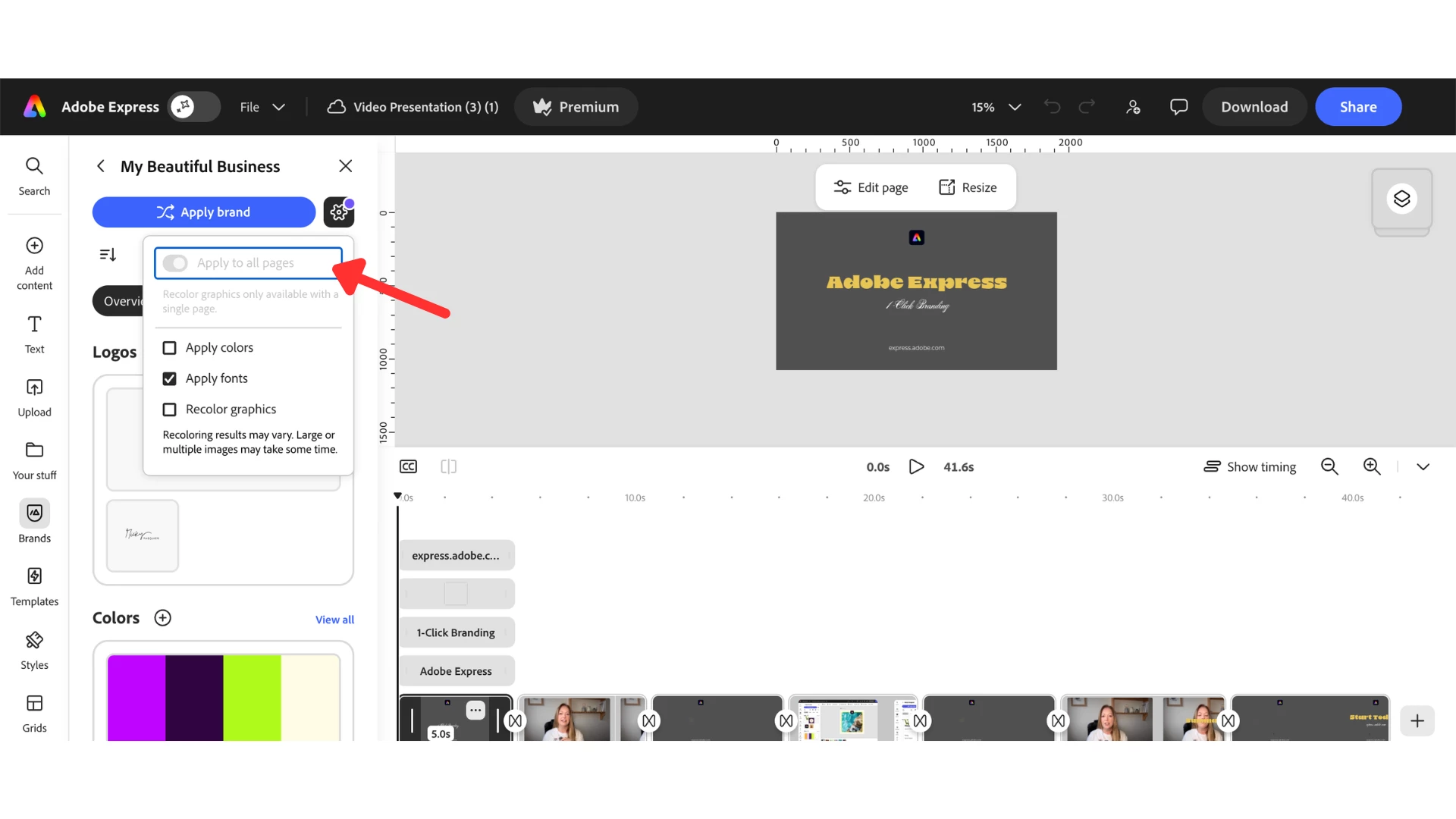
I’m unsure if this was always the case, but it seems that the “Apply to all pages” button in Brands cannot be toggled on/off when working with video templates (please see attached image).
 

I can imagine this would be very confusing for users 🙁 (it certainly confused me!)


Is there any reason why this is the case and are there any plans to change this at any stage? I’m in the middle of putting together a video tutorial for Adobe Express about how to apply Brand colours & fonts to templates, and this makes things very awkward. 

Many thanks. 
 

    Correct answer Rose DV

    Hey ​@NickyPasq !!


    Thanks so much for posting this - I completely understand why this would feel confusing, especially when you’re trying to put together a clear tutorial experience.


    What you’re seeing is expected behavior, though it’s definitely not obvious at first glance. The “Apply to all pages” option only becomes active when a document contains more than one page. With video templates, many of them are structured as a single-page document (even if they contain multiple scenes or elements within the timeline), so the toggle remains disabled in those cases.


    That said, I’ll make sure this feedback is shared with the product team so they’re aware of the confusion it can cause in workflows like yours.


    In the meantime, if you happen to work with a multi-page design, you should see the option become available as expected.


    Appreciate you raising this, and best of luck with your tutorial, it sounds like a great resource for users! Would love to take a look after it's done, if you don't mind sharing!


    Best,

    Rose

    1 reply

    Rose DV
    Community Manager
    Rose DVCommunity ManagerCorrect answer
    Community Manager
    April 29, 2026

    Hey ​@NickyPasq !!


    Thanks so much for posting this - I completely understand why this would feel confusing, especially when you’re trying to put together a clear tutorial experience.


    What you’re seeing is expected behavior, though it’s definitely not obvious at first glance. The “Apply to all pages” option only becomes active when a document contains more than one page. With video templates, many of them are structured as a single-page document (even if they contain multiple scenes or elements within the timeline), so the toggle remains disabled in those cases.


    That said, I’ll make sure this feedback is shared with the product team so they’re aware of the confusion it can cause in workflows like yours.


    In the meantime, if you happen to work with a multi-page design, you should see the option become available as expected.


    Appreciate you raising this, and best of luck with your tutorial, it sounds like a great resource for users! Would love to take a look after it's done, if you don't mind sharing!


    Best,

    Rose
