
Participating Frequently
March 17, 2022
Answered

Cant colloborate creative cloud express

  • March 17, 2022
  • 2 replies
  • 1403 views

My colleagues dont recieve my requests when I invite them to my projects in Creative Cloud Express - it just says pending ?

This topic has been closed for replies.
Correct answer Amitej S

Hey there,


Thanks for reaching out to us; sorry for your experience with the Creative Cloud Express. This shouldn't be happening. 

I'd like to inform you when an email id is added from the "Invite to" option, an email is sent to the invitee with a link that says "Start Collaborating".

Clicking on this link redirects the invitee to the Creative Cloud Express page then the invitee has to click on the bell icon on the top right corner to approve the invitation.

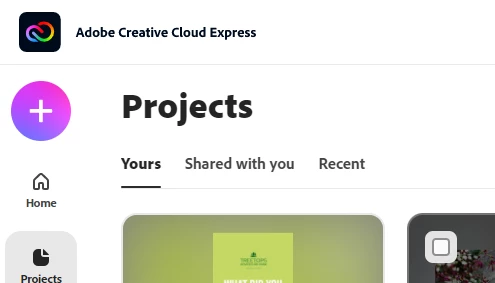
Once the user approves it, the page redirects to the project or they can go to the "Shared with You" tab from the "Projects" option in the sidebar to access that project.


Note: You may also ask your colleagues to login to creative Cloud Express using the same email id on which the invitation is sent. 


Let us know how it goes.


Regards,

Amitej

2 replies

Anouk5C8CAuthor
Participating Frequently
March 17, 2022

I think I have two accounts even though I tried to delete one both linked to the same email?


Anouk5C8CAuthor
Participating Frequently
March 17, 2022

 Is this the problem ?

Amitej S
Community Manager
Community Manager
March 18, 2022

Thanks for responding. Could you please reshare your screenshots as we are unable to see the information clearly? 

Amitej S
Community Manager
Amitej SCommunity ManagerCorrect answer
Community Manager
March 17, 2022

Hey there,


Thanks for reaching out to us; sorry for your experience with the Creative Cloud Express. This shouldn't be happening. 

I'd like to inform you when an email id is added from the "Invite to" option, an email is sent to the invitee with a link that says "Start Collaborating".

Clicking on this link redirects the invitee to the Creative Cloud Express page then the invitee has to click on the bell icon on the top right corner to approve the invitation.

Once the user approves it, the page redirects to the project or they can go to the "Shared with You" tab from the "Projects" option in the sidebar to access that project.


Note: You may also ask your colleagues to login to creative Cloud Express using the same email id on which the invitation is sent. 


Let us know how it goes.


Regards,

Amitej