Participant
August 31, 2024
Answered

Crop a circle

  • August 31, 2024
  • 1 reply
  • 415 views

How do I crop a photo to be round so I can paste it onto a document as a round photo without the white corners?

This topic is closed to new replies. Start a new post to keep the conversation going.
Correct answer thejanebradbury

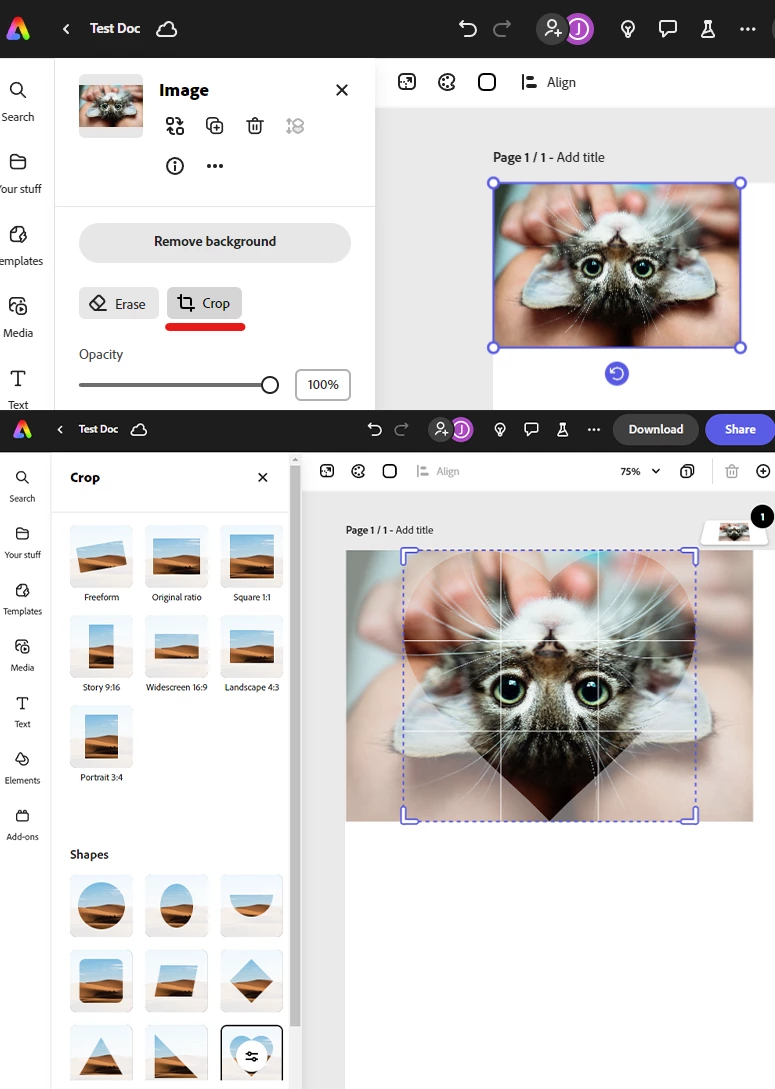
Here's how to crop an image:

  1. Click on your image to select it. 
  2. In the panel on the left-hand side choose Crop.
  3. Pick your desired chape from the all the options. 


1 reply

thejanebradbury
Community Expert
thejanebradburyCommunity ExpertCorrect answer
Community Expert
August 31, 2024

Here's how to crop an image:

  1. Click on your image to select it. 
  2. In the panel on the left-hand side choose Crop.
  3. Pick your desired chape from the all the options.