


Participant
March 3, 2025
Answered

Customizing background size after customizing the format

  • March 3, 2025
  • 1 reply
  • 586 views

In the Spark post App, I could easily copy a projct (fx into the 3 different sizes Fb wants in Meta) background image adjusted itself -  Now In the CC Adobe Express app, the backgrund picture doesn't addapt in to the new (and bigger) format - So what is the trick to change the size, so the backgrund picture cover the hole backgrund? I'm from Denmark, sorry if my english is deficient.
Correct answer Abhi.G @ ADBE

@pi_rosamunde_8926 

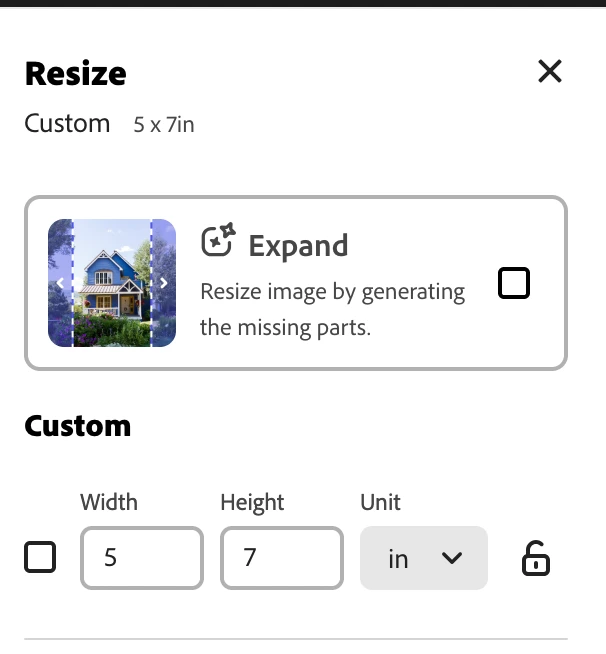
I am also curious whether you have the generative Expand setting on?


Thanks,

Abhi G


1 reply

Participant
March 3, 2025

In the Spark post App, I could easily copy a projct (fx into the 3 different sizes Fb wants in Meta) background image adjusted itself -  Now In the CC Adobe Express app, the backgrund picture doesn't addapt in to the new (and bigger) format - So what is the trick to change the size, so the backgrund picture cover the hole backgrund? I'm from Denmark, sorry if my english is deficient.

David__B
Adobe Employee
Adobe Employee
March 3, 2025

Hi @pi_rosamunde_8926

If you select whatever layer you want to use as the background and click the "Set as background" option it should fill the image area and move the layer to the bottom. Please see the attached screenshot for reference.

Best,

Dave

Participant
March 10, 2025

Thank you, Dave. I can certainly use that for another project.

I'm going to adjust an earlier project to another format, which there's already with text boxes here and there. But I think, I got it now - By reading the comment below your's - about the generate expand function on - which I thought I'd already tried - but apparently not with enough patience 😉 while waiting for for the rainbow show to do its magic .. Thanks again 🙏