


Participant
Oct 26, 2022 8:37 AM UTC
Question

Deleting "Custom" Fonts in Adobe Express

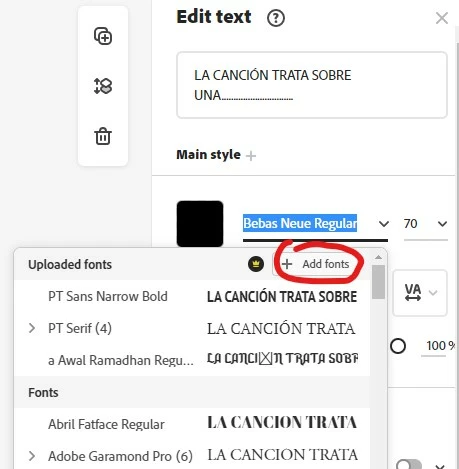
I would like to know how to delete a custom font in Adobe Express, so that they don't appear in the "uploaded fonts" section anymore. I uploaded the font by clicking on the "add font" option found when you select your font on the "edit text" menu on Adobe Express. Thanks in advance.
This topic is closed to new replies. Start a new post to keep the conversation going.

3 replies

Amitej S
Community Manager
Community Manager
Oct 26, 2022 9:52 PM UTC

Hey @shotbyortiz 

I appreciate you bringing this up. As of now, custom fonts added to a project in Adobe Express cannot be deleted, although it would be nice to have this feature. We will inform the team about this, & you can also inform our engineering team directly by posting a feature request at https://bit.ly/expressuser. If there is a new development, we'll let you know.


We value your thoughts & patience as we work together to develop this app.

~Amitej

Translate
Participant
Oct 27, 2022 7:11 AM UTC

Sounds great! Thank you for the fast response!

Translate