This topic is closed to new replies. Start a new post to keep the conversation going.
Stephen @ ADBECorrect answer
Adobe Employee
March 6, 2024

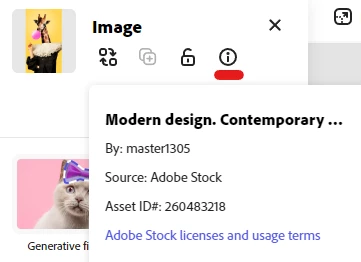
There may be another asset that isn't your background that has been removed from Adobe Stock. You can check by clicking on the various image layers, and then in the image panel on the left click the little i icon for the information panel. If that Stock Asset ID# matches the #587746457 from the messages you are seeing, then you'll need to find a replacement asset to use.
 

We do recognize that this is not a great experience and are working to make identifying which asset is not licenseable anymore easier.


1 reply

Stephen @ ADBECorrect answer
Adobe Employee
March 6, 2024

There may be another asset that isn't your background that has been removed from Adobe Stock. You can check by clicking on the various image layers, and then in the image panel on the left click the little i icon for the information panel. If that Stock Asset ID# matches the #587746457 from the messages you are seeing, then you'll need to find a replacement asset to use.


We do recognize that this is not a great experience and are working to make identifying which asset is not licenseable anymore easier.

Translate