
Agnès M.
Participant
January 14, 2022
Answered

export the animations made on cc express

  • January 14, 2022
  • 2 replies
  • 823 views

Hello ! I discovered the animation tool in cc express, find it very interesting, 

but I absolutely do not see how to use it !!! 

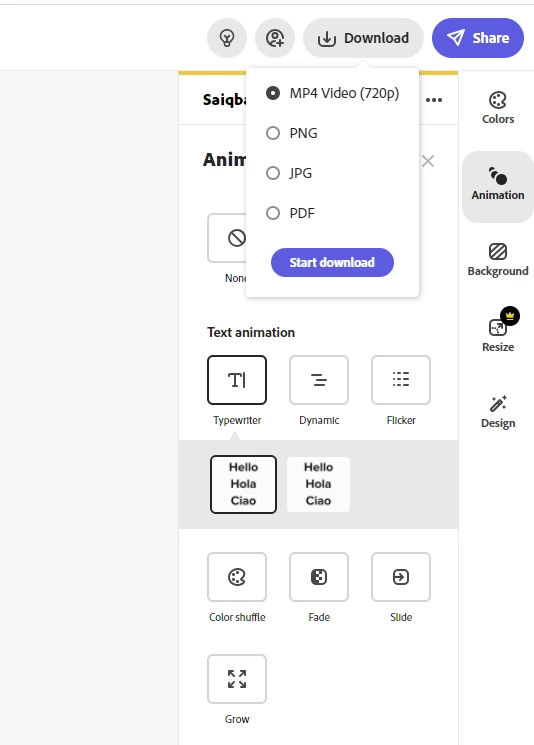
The download offered do not respond to an animation... just png - jpg and pdf ??? 

We can create text and image animation but how to use it !!!! 

Thank you for your lights !!!!!!

Agnès M.
This topic has been closed for replies.
Correct answer Saquib.Iqbal

Hi Agnès M.,


Thanks for reaching out. Once you apply the animation(text or photo animation) to your project and then click "Download" you will see an option "MP4 Video (720p)". Select that option and then hit "Start Download"


Hope this helps.


Thanks,
Saquib


2 replies

Saquib.IqbalCommunity ManagerCorrect answer
Community Manager
January 14, 2022

Hi Agnès M.,


Thanks for reaching out. Once you apply the animation(text or photo animation) to your project and then click "Download" you will see an option "MP4 Video (720p)". Select that option and then hit "Start Download"


Hope this helps.


Thanks,
Saquib


Agnès M.
Agnès M.Author
Participant
January 14, 2022

I've found 😅😬

Maybe there was an update... I don't know but now... but now we can find .mp4 for my greatest happiness!!!!

Community Manager
January 14, 2022

Awesome! Great to hear you found it.


Thanks,

Saquib