


Participant
Jan 8, 2024 2:52 PM UTC
Answered

File Version history Adobe Express

I deleted several clips out a video project to download one segment of it with the intent to CMD+Z back to the original state after the download was complete. Then the browser crashed, and now Adobe Express only has the one clip in my project – I can't undo back to the full video.


Does Adobe Express have version history saved anywhere, or is the work lost thanks to my quick and lazy workflow?


Thanks!
This topic is closed to new replies. Start a new post to keep the conversation going.
Abhi.G @ ADBECorrect answer
Adobe Employee
Jan 8, 2024 2:56 PM UTC

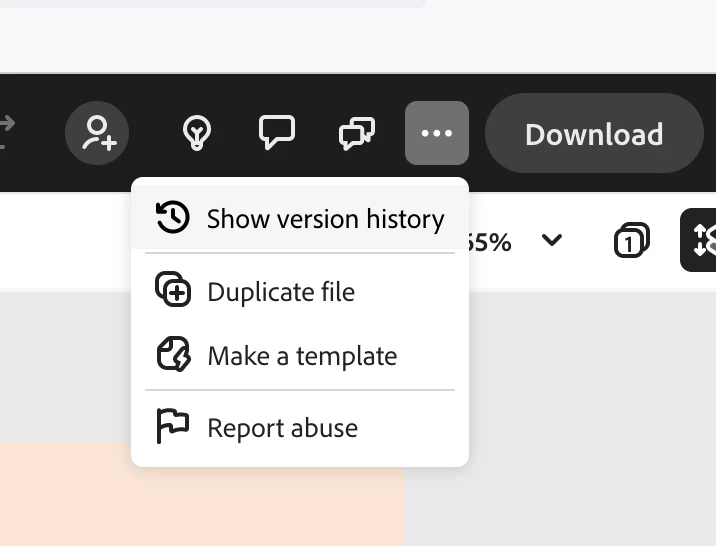
Yep, it does (... menu in the header bar to the left of Download)


11 replies

Participant
Aug 22, 2024 7:15 PM UTC

So theres no way of actually reverting the current file back to a previous version? Creating a duplicate doesn't copy over all the comments. So you now have a new file with the version you actually want, but no comments. 

Translate
Known Participant
Sep 24, 2024 8:30 AM UTC

is there anyway of reverting to a previous version of a webpage in Express? @Abhi.G @ ADBE 

it relates to this bug: https://community.adobe.com/t5/adobe-express-bugs/overwrite-webpage-with-different-webpage/idi-p/14877467


Translate
Abhi.G @ ADBECorrect answer
Adobe Employee
Jan 8, 2024 2:56 PM UTC

Yep, it does (... menu in the header bar to the left of Download)


Translate
Participant
Feb 2, 2024 11:50 PM UTC

I desperately need this fix, but I can't find this header bar anywhere. Where did you find it? How can I get there?

Translate
Adobe Employee
Feb 3, 2024 1:17 AM UTC

@brockh71645329 are you perhaps editing a Webpage project (does the URL in the browser's address bar look something like https://new.express.adobe.com/webpage/design/urn:aaid:sc:US:5f77dbcd-5728-4e91-8db5-f65449ecd9bc) ?

Version history is not available for these projects, unfortunately.

Translate
Participant
Jan 8, 2024 2:55 PM UTC

Found the version history and restored the project. If anyone else needs to know:


In the black bar across the top: click the elipses (...) and then select Version Histoy. Select the Version to restore, then Adobe Express will make a copy of it for you.

Translate
Participant
Feb 2, 2024 11:53 PM UTC

Can you tell me where this is? "Across the top" of what? I desperately need this fix and I can't find anything anywhere that has what I'm seeing in your screen shot.

Translate