Participant
Jul 21, 2022 6:10 PM UTC
Answered

Flyers do not print to 8.5 x 11

Hello Everyone,


I designed a promo flyer and when I download the PDF and print, it is not scaled properly. The flyer prints within the standard card stock leaving a huge white border from the card stock. Where is the setting in AE to make it 8.5 x 11 inches please?


Thanks!
Andy

This topic is closed to new replies. Start a new post to keep the conversation going.
Amitej S
Amitej SCorrect answer
Community Manager
Jul 21, 2022 10:27 PM UTC

Hi @Andy25341946tmf8 


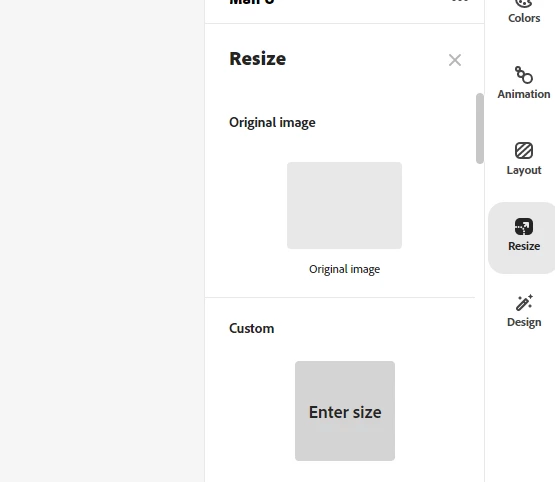
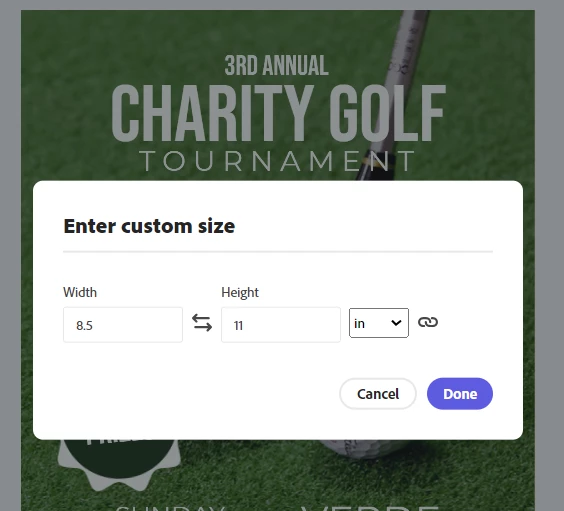
I'd like to inform you that Adobe Express premium users have the ability to resize the project anytime to meet their needs. The project can be scaled using social media presets or any custom size. 

The size range of the post could be anywhere between [0.17-20] inches.


You may find Resize option on the right side of the Adobe Express Web app. (please refer to the screenshots)


Let us know if this helps.


Regards,

Amitej

1 reply

Amitej S
Community Manager
Amitej SCommunity ManagerCorrect answer
Community Manager
Jul 21, 2022 10:27 PM UTC

Hi @Andy25341946tmf8 


I'd like to inform you that Adobe Express premium users have the ability to resize the project anytime to meet their needs. The project can be scaled using social media presets or any custom size. 

The size range of the post could be anywhere between [0.17-20] inches.


You may find Resize option on the right side of the Adobe Express Web app. (please refer to the screenshots)


Let us know if this helps.


Regards,

Amitej

Translate