Participant
November 30, 2023
Answered

How to change the color of text in a Flyer

  • November 30, 2023
  • 1 reply
  • 1410 views

Hiyas,

I'm using the Adobe Express website to design a flyer. I pasted (?) the text from a website into the flyer but I cannot find where to actually change the color of the text.


Any ideas?


Jane

This topic has been closed for replies.
Correct answer thejanebradbury

Hello Jane, there's a couple of ways to do this. In the layer stack on the right-hand side click the text layer that you pasted. On the left-hand side you should see the Text panel with all your text options below. 


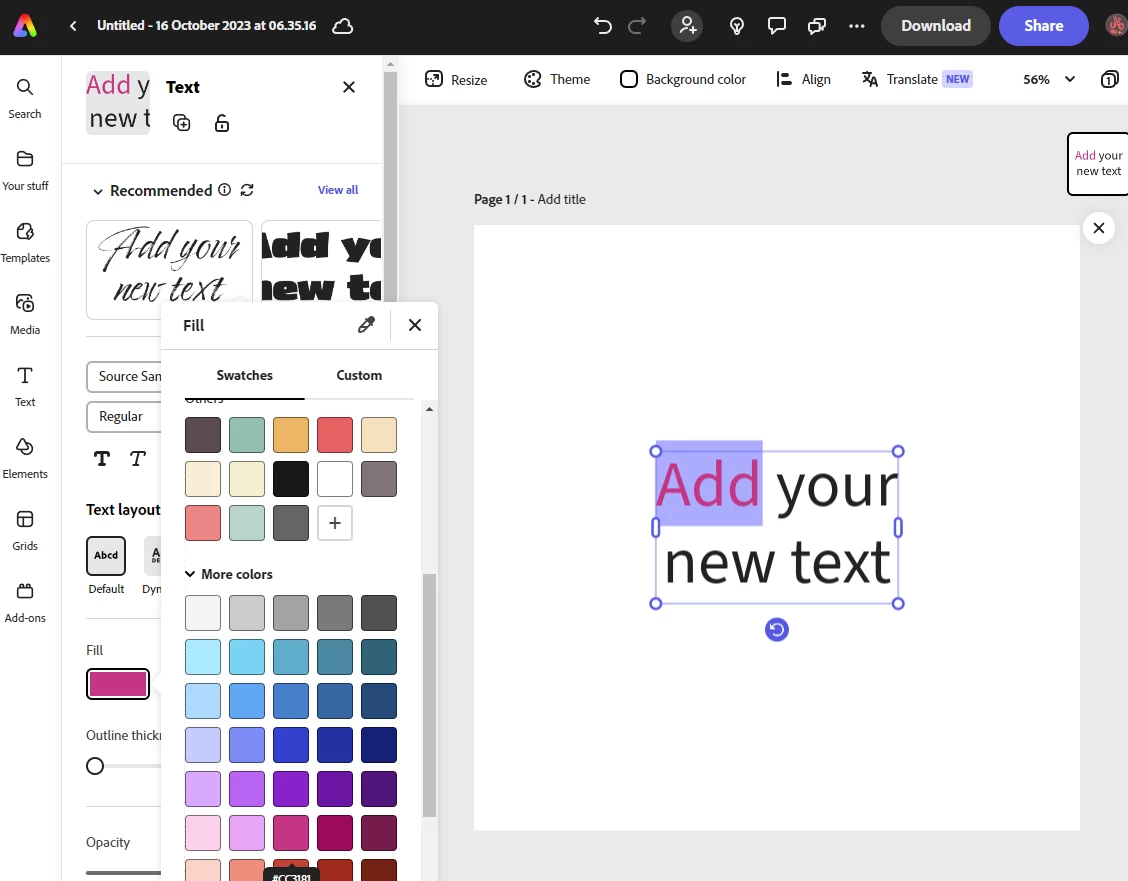
To change colour you can click the Fill box and then use the colour menu to find your colour .  As the screenshot shows, you can also click in the text box and highlight the letters to change colour. 

1 reply

thejanebradbury
Community Expert
thejanebradburyCommunity ExpertCorrect answer
Community Expert
December 1, 2023

Hello Jane, there's a couple of ways to do this. In the layer stack on the right-hand side click the text layer that you pasted. On the left-hand side you should see the Text panel with all your text options below. 


To change colour you can click the Fill box and then use the colour menu to find your colour .  As the screenshot shows, you can also click in the text box and highlight the letters to change colour.