



Faith5C32
Known Participant
February 26, 2026
Answered

I need to be able to place and scale a logo in Adobe Express

  • February 26, 2026
  • 1 reply
  • 55 views

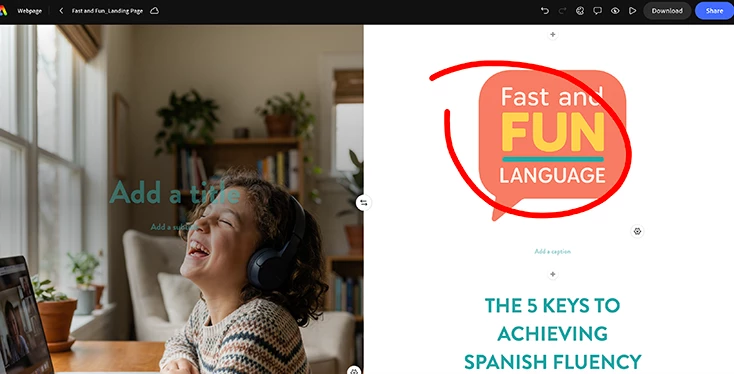
I am new to Adobe Express, and I am trying to build a simple landing page for a client. I have a theme. But is this really so hard? I just want to be able to place an overlay image (a small logo) But when I click add image, it imports it as unscalable. 


I just want to overlay this logo and be able to scale it. Does Express really not have layers? Pleeeaaase help I just want to place a logo!!!!!

 

Correct answer Tarun Saini

Hi ​@Faith5C32,


Thanks for reaching out!

Adobe Express does have layers, but Adobe Express web/landing pages work differently from posters or social graphics. On web pages, images added via Add image are placed within a section and may be constrained by the theme/layout, which is why your logo may appear unscalable or feel “locked.”

To place a logo as an overlay:

  • Try adding it as a design element (not as a page image) so it behaves like a movable object.
  • Use the Layers panel (right side) to bring the logo to the front.


Please check this article for more information- https://helpx.adobe.com/express/web/arrange-layers-and-pages/layers.html


Regards,

Tarun

1 reply

Tarun Saini
Community Manager
Tarun SainiCommunity ManagerCorrect answer
Community Manager
March 2, 2026

Hi ​@Faith5C32,


Thanks for reaching out!

Adobe Express does have layers, but Adobe Express web/landing pages work differently from posters or social graphics. On web pages, images added via Add image are placed within a section and may be constrained by the theme/layout, which is why your logo may appear unscalable or feel “locked.”

To place a logo as an overlay:

  • Try adding it as a design element (not as a page image) so it behaves like a movable object.
  • Use the Layers panel (right side) to bring the logo to the front.


Please check this article for more information- https://helpx.adobe.com/express/web/arrange-layers-and-pages/layers.html


Regards,

Tarun