


Participant
September 5, 2025
Answered

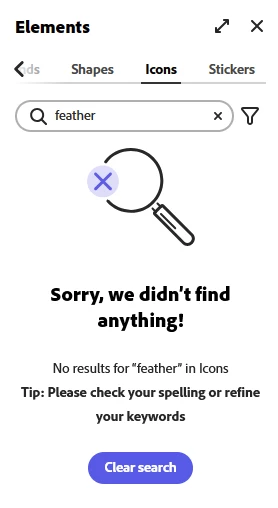
Icon search not loading

  • September 5, 2025
  • 4 replies
  • 741 views

I have tried on multiple browsers with and without VPN, but I cannot get the Icon search to work.  It keeps giving me an error 'Sorry, we didn't find anything! No results for "whatever I search for, feather, ball, etc..." in Icons...'
 

Correct answer DenisVranjkovic

Hello, as of yesterday everything related to search results are working. 

4 replies

Inspiring
October 15, 2025

Also have problem, butt when i search let's say ball or feather i get all results, no filtering, just all. Make no sense.

Amitej S
Community Manager
Community Manager
October 16, 2025

Hey @DenisVranjkovic, Welcome to our Adobe Express community! 

Can you share a screen recording of the search results that appear when you look for a desired asset? We'd like to see what experience comes up for you to investigate it. I'd also suggest you try once in incognito/private browsing mode to see if that makes any difference. 


Do share your observations!

DenisVranjkovicCorrect answer
Inspiring
October 16, 2025

Hello, as of yesterday everything related to search results are working. 

Participant
September 8, 2025

Same problem ! And it's not the first time... 

Community Manager
September 8, 2025

Hi @mayralima,


Thank you for sharing the details. I’ve escalated this case to our engineering team for further investigation. We’ll look into why the Icon Search isn’t returning results and will get back to you as soon as we have an update.

In the meantime, you can try refreshing the page or checking again later. If the issue persists, please let us know your device and app/browser version.


^MM

Participant
September 8, 2025

Just to add - its not just the search function - the usual list of all icons isnt showing at all and the section doesnt show if you select 'all' in elements like it did previously 


Participant
September 8, 2025

I am having the same issue on all browsers and mobile app - I have cleared cache, cookies, reinstalled app and logged in and out

Tarun Saini
Community Manager
Community Manager
September 5, 2025

Hi @victoriaw74790733,


Welcome to the community! We're sorry to hear about this. Please try signing out and signing in again to check if that helps. Also, try reinstalling the app and let us know if that helps.


Regards,

Tarun