Participating Frequently
June 12, 2025
Answered

Infuriating, Intrusive Red underlines

  • June 12, 2025
  • 2 replies
  • 1016 views

Hi, thanks in advance. I know nothing about design but I'm a Master of the English language and need to be forever rid of whatever these red lines are under text in design drafts

Correct answer Dragos37878852hyou

Hi @thothschisel22 . This most likely is the recently launched Express Spellchecker. 
I’m part of the team that worked on it, and I'm truly sorry that it did not meet your expectations and appreciate you taking the time to flag this.

The good news is that you can turn it off quite easily. Just right-click on any text inside the editor, and you'll find a toggle in the contextual menu to disable it.

That said, your input is extremely valuable as we continue to refine the experience. If you’re open to it, I’d love to understand more about what didn’t work well for you. A few questions that would help us improve:

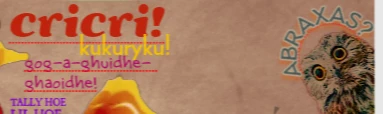
  • From the screenshot, it looks like the underlined words may not be standard dictionary words. What would you have expected to happen in this case?

  • How could we have made it more clear that the underlines were spellchecker highlights?

  • How could we make the option to turn off the spellchecker easier to find?

  • Any other thoughts or suggestions are more than welcome.


Thank you for using our product and we are working on making things better in order to meet the expectations of our clients. 
2 replies

Dragos37878852hyouCorrect answer
Adobe Employee
June 13, 2025

Hi @thothschisel22 . This most likely is the recently launched Express Spellchecker. 
I’m part of the team that worked on it, and I'm truly sorry that it did not meet your expectations and appreciate you taking the time to flag this.

The good news is that you can turn it off quite easily. Just right-click on any text inside the editor, and you'll find a toggle in the contextual menu to disable it.

That said, your input is extremely valuable as we continue to refine the experience. If you’re open to it, I’d love to understand more about what didn’t work well for you. A few questions that would help us improve:

  • From the screenshot, it looks like the underlined words may not be standard dictionary words. What would you have expected to happen in this case?

  • How could we have made it more clear that the underlines were spellchecker highlights?

  • How could we make the option to turn off the spellchecker easier to find?

  • Any other thoughts or suggestions are more than welcome.


Thank you for using our product and we are working on making things better in order to meet the expectations of our clients. 

Participant
June 29, 2025

Greetings Adobe team,

Since the update to the spellchecker feature we have seen the red lines come through on the download sometime. It isn't every time we download the designs it shows but it does at random it seems. We are using the .jpg download. 

Thanks for your work. 

Amitej S
Community Manager
Community Manager
June 12, 2025

Hey @thothschisel22, Welcome to our Adobe Express Community! 


Can you confirm if you're using Adobe Express or other Adobe apps? What device platform are you working from, desktop, tablet, or mobile device? Also, can you share the text formatting details used for that specific text box? You may need to select the underlined text and share the screen that pops up, providing details like font used, font size, etc. 


Thanks!

Participating Frequently
June 12, 2025

Ok, apologies... I assumed whatever you were working from just auto-indicated such info through the community portal. Yeah so, ancient iMac, so desktop... Adobe Express.  As far as "text formatting details...specific..."  brobro...IDK what you mean... this sh** is like, EVERYWHERE

Participating Frequently
June 12, 2025

...meaning it's like some manner of garbage default setting