Participant
Oct 28, 2026 9:06 PM UTC
Answered

Instagram labels my videos as AI-generated because of Adobe Express design elements

I create cultural content for social media using Premiere Pro, After Effects, Illustrator and Photoshop. I occasionally download design elements from Adobe Express and animate them myself.

Recently, Instagram started labelling my videos as AI-generated, even though the entire creative process, from research and scripting to editing and animation, is done by me.

After investigating, I discovered that just two small flower graphics downloaded from Adobe Express were enough to trigger the AI label on my entire video. When I removed them and exported the video again, the AI-related Content Credentials disappeared.

Is this really fair? A video that I've spent hours researching, writing and editing is being labelled as AI-generated simply because I animated a couple of design elements from Adobe Express.

What makes this even more frustrating is that Adobe Express doesn't seem to offer a filter to exclude AI-generated assets from search results.

To be honest, this experience has made me reconsider using Adobe Express altogether. I don't want my original editorial work to be misrepresented because of a few decorative elements.

Adobe, could you please introduce a clear filter for non-AI-generated assets and give creators more control over how Content Credentials are applied to their work?

I'd also love to hear whether other creators have experienced the same issue.
    Imaginerie
    ImaginerieCorrect answer
    Community Expert
    Oct 28, 2026 11:35 PM UTC

    Fair, I wouldn’t tell, but that’s the way Instagram decided to qualify things (to be honest, I have heard of people who created all their stuff from scratch, even filming the process without adding any design elements and Instagram mislabelled it). This process is automatic, and obviously Instagram won’t tell you how they are using the technology. 


    However, if the elements you added were AI generated, either by you, or through assets from Adobe stock that are AI generated by the person who submit them, I think it’s fair that the whole thing is labelled as such: It’s a bit all or nothing, there is no such thing as “half AI”.

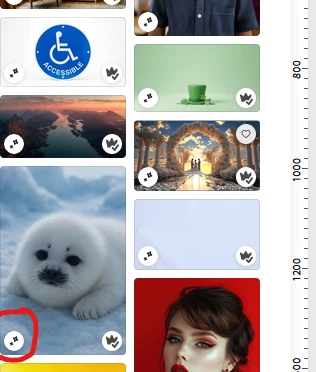
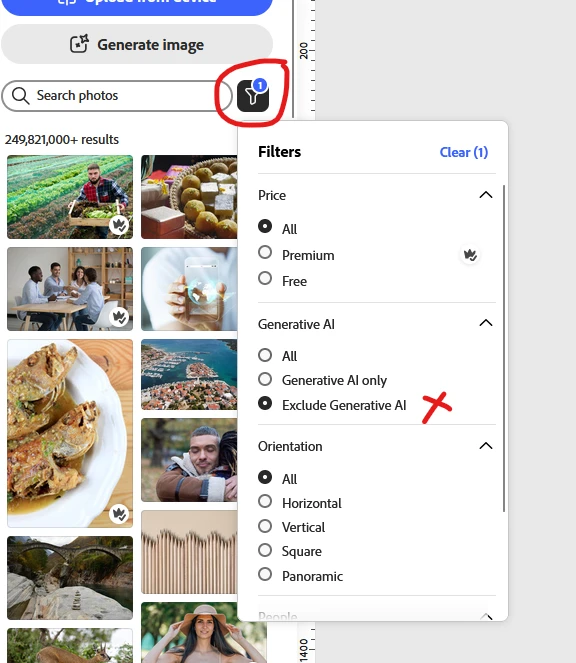
    That said, there is a way to check if the assets are AI generated, and it’s contained in a little icon next to the asset, and even a filter to exclude gen AI assets if that’s you want to do.
    See screenshots from the desktop version.


    GenAI icon
    Assets search filter


    7 replies

    Rose DV
    Community Manager
    Community Manager
    Oct 29, 2026 6:17 PM UTC

    Hey ​@ozgeozge!

    Thanks for explaining your workflow. Totally understand why a label on the whole video feels misleading when your research, writing, editing and animation are your own.

    Content Credentials can indicate that an included asset was AI-generated; that doesn’t mean the entire video was generated by AI. Instagram determines how it interprets those signals and displays its label - Adobe doesn’t control that presentation.

    Thank you, ​@Imaginerie, for pointing out the filter, and we’re glad you’ve found it. Using “Exclude generative AI” in the asset search filters, and checking the AI indicator on individual assets, can help you choose elements for future projects. 

    Your request for clearer asset identification and more transparency about how individual assets affect a finished work is understandable! Thank you for sharing this example and its impact on your creative work.

    Rose

    Translate
    ozgeozgeAuthor
    Participant
    Oct 30, 2026 10:50 AM UTC

    Thank you very much for your understanding and clarification Rose!

    Translate
    Imaginerie
    Community Expert
    ImaginerieCommunity ExpertCorrect answer
    Community Expert
    Oct 28, 2026 11:35 PM UTC

    Fair, I wouldn’t tell, but that’s the way Instagram decided to qualify things (to be honest, I have heard of people who created all their stuff from scratch, even filming the process without adding any design elements and Instagram mislabelled it). This process is automatic, and obviously Instagram won’t tell you how they are using the technology. 


    However, if the elements you added were AI generated, either by you, or through assets from Adobe stock that are AI generated by the person who submit them, I think it’s fair that the whole thing is labelled as such: It’s a bit all or nothing, there is no such thing as “half AI”.

    That said, there is a way to check if the assets are AI generated, and it’s contained in a little icon next to the asset, and even a filter to exclude gen AI assets if that’s you want to do.
    See screenshots from the desktop version.


    GenAI icon
    Assets search filter


    Translate
    ozgeozgeAuthor
    Participant
    Oct 29, 2026 12:36 AM UTC

    Oh thank you very much! Last time I checked I could not see that filter! I was not even aware that the two small flowers I downloaded were AI! I will use this filter from now on.

    Translate
    Imaginerie
    Community Expert
    Community Expert
    Oct 29, 2026 7:43 AM UTC

    No worries, I think the filters are a recent-ish addition.
    Glad I could help!


    Translate