



Connor29540996zllm
Participant
June 10, 2026
Answered

Is there a way to disable AI generated assets from appearing in the Adobe Express search functions?

  • June 10, 2026
  • 1 reply
  • 12 views

I found a poster template that I thought I liked. However, after I sent the completed poster to everyone, I noticed the main decorative image was AI generated. This is absolutely unacceptable to me and I am wondering if there is a way to keep it from happening again. I thought I could trust things like templates from having AI slop in them, so I did not check closely at all of the assets in the template.

    Correct answer Amitej S

    Hi ​@Connor29540996zllm! Thanks for bringing this up. 

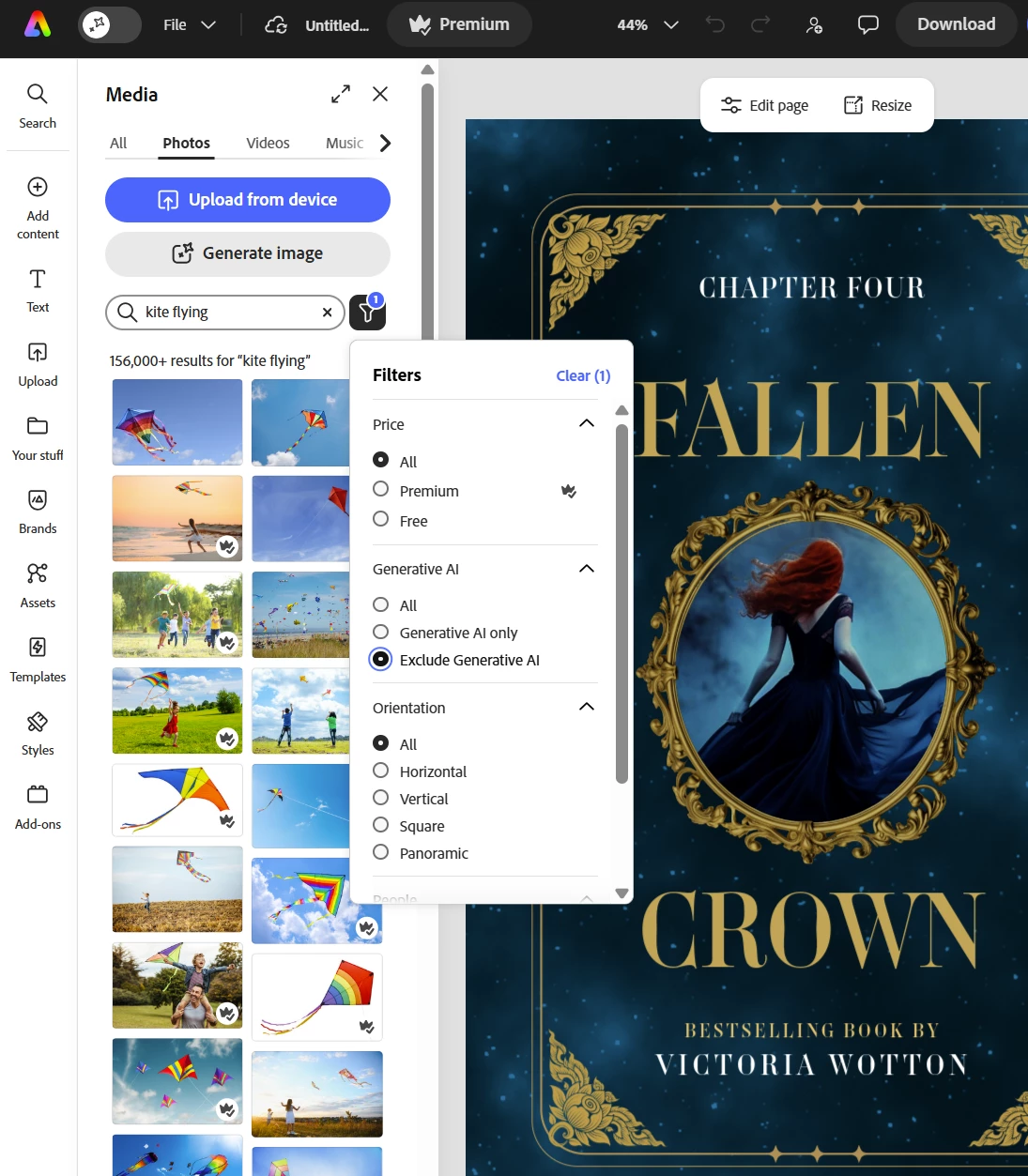
    As of now, there isn’t any direct way to totally turn off AI-generated content and features in Adobe Express, but Adobe Express lets you filter out AI-generated content from your search results, from inside the Media panel. (screenshot attached)

    All you’d need to do is: 

    • Open your project, go to Media, run a search, then click the Filter icon next to the search bar
    • Under the Generative AI section, select Exclude generative AI to hide AI Stock assets

    The filter applies to Adobe Stock photos, videos, and backgrounds, not to templates. Also, the filters reset per search. 


    I’d also suggest that you raise a feature request for the same here: https://adobeexpress.uservoice.com/forums/951181-adobe-express


    Hope this helps!

    Best!

    1 reply

    Amitej S
    Community Manager
    Amitej SCommunity ManagerCorrect answer
    Community Manager
    June 11, 2026

    Hi ​@Connor29540996zllm! Thanks for bringing this up. 

    As of now, there isn’t any direct way to totally turn off AI-generated content and features in Adobe Express, but Adobe Express lets you filter out AI-generated content from your search results, from inside the Media panel. (screenshot attached)

    All you’d need to do is: 

    • Open your project, go to Media, run a search, then click the Filter icon next to the search bar
    • Under the Generative AI section, select Exclude generative AI to hide AI Stock assets

    The filter applies to Adobe Stock photos, videos, and backgrounds, not to templates. Also, the filters reset per search. 


    I’d also suggest that you raise a feature request for the same here: https://adobeexpress.uservoice.com/forums/951181-adobe-express


    Hope this helps!

    Best!