


Participant
December 9, 2025
Answered

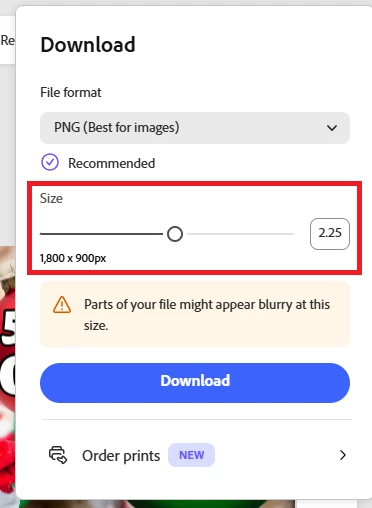
Is there any way to set the default download size to a scale of 1?

  • December 9, 2025
  • 1 reply
  • 234 views

Recently Adobe Express started offering the option to download images at different scales (1x, 2x, or almost any custom scale). This is fine, except that it does not default to 1x (or any specific scale for that matter), so when I go to download an image it might default to 2.25x or 3x or 1.5x and I have to adjust it almost every time. Is there any way to set this to default at 1x? Or even to disable the feature? Thanks for any help you can offer!Screenshot 2025-12-09 103748.png
Correct answer Tarun Saini

Hi @Koda283015761tvb,


Thanks for your response. This behavior is expected based on the current capabilities of Adobe Express and our export control settings. You can share your feedback here  https://adobeexpress.uservoice.com/forums/951181-adobe-express as thispage is being monitored by our product team.


Regards,

Tarun

1 reply

Amitej S
Community Manager
Community Manager
December 9, 2025

Hi @Koda283015761tvb, welcome to the Adobe Express community! Thanks for reaching out.

I tried this on my end, and every time I export a file, the size reverts to 1x. I tried exporting at different scales on different files, but it reverts to 1x for me. Please try again after clearing the browser's cache and cookies to see if that makes any difference. 

Do share your observations here!


Best!

Participant
December 9, 2025

Thanks for checking it out, Amitej. I cleared my cache & cookies but it did not change anything. I am using Chrome on the desktop btw. Thanks!

Tarun Saini
Community Manager
Tarun SainiCommunity ManagerCorrect answer
Community Manager
December 12, 2025

Hi @Koda283015761tvb,


Thanks for your response. This behavior is expected based on the current capabilities of Adobe Express and our export control settings. You can share your feedback here  https://adobeexpress.uservoice.com/forums/951181-adobe-express as thispage is being monitored by our product team.


Regards,

Tarun
