


Known Participant
October 8, 2025
Question

Issues with Template migration from brand to projects

  • October 8, 2025
  • 1 reply
  • 285 views

Hi,

After failed attempts to contact support - I'd like to put this question out there to see if anyone else has had issues when they have migrated all their brand templates from BRAND to PROJECTS (as being prompted by Adobe to do this).

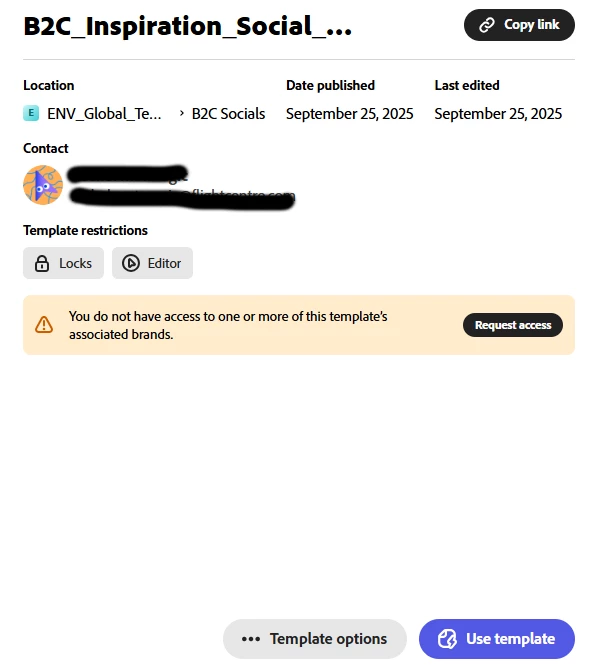
Issue seems to be that some templates are flagging an error to the allocated users I have allowed access to, stating "YOU DO NOT HAVE ACCESS TO ONE OR MORE OF THIS TEMPLATE'S ASSOCIATED BRANDS" when all were migrated with the same permissions all at once and its not happening with all, just some of the templates. The same templates had no issues until they were migrated.

When the user requests permission, nothing comes to me. Has anyone else had this issue?


Thanks,
R


1 reply

Community Manager
October 8, 2025

Hi @RachelMata,


Thank you for sharing the details of your issue. We understand how frustrating this must be, especially after migrating multiple templates. Could you please confirm whether this issue occurs with specific brands only or randomly across different templates? Also, try checking if the affected templates are still linked to the correct brand in Project settings. 


^MM

Known Participant
October 8, 2025

Hi Mahmoud,


It seems to be happened randomly with some templates. All the templates were migrated using the prompt by Adobe to move them, all done at once and all from the same brand folder.


How do I check this?

Also, try checking if the affected templates are still linked to the correct brand in Project settings

Thanks

Tarun Saini
Community Manager
Community Manager
October 9, 2025

Hi @RachelMata,


Thanks for your response. I'd like to inform you that the case has been escalated to our product team, and we will share an update with you once we receive any information from them.


Regards,

Tarun