


FSchleyhahn
Inspiring
April 18, 2022
Question

No Thumbnail When Sharing Creative Cloud Express Project

  • April 18, 2022
  • 1 reply
  • 2391 views

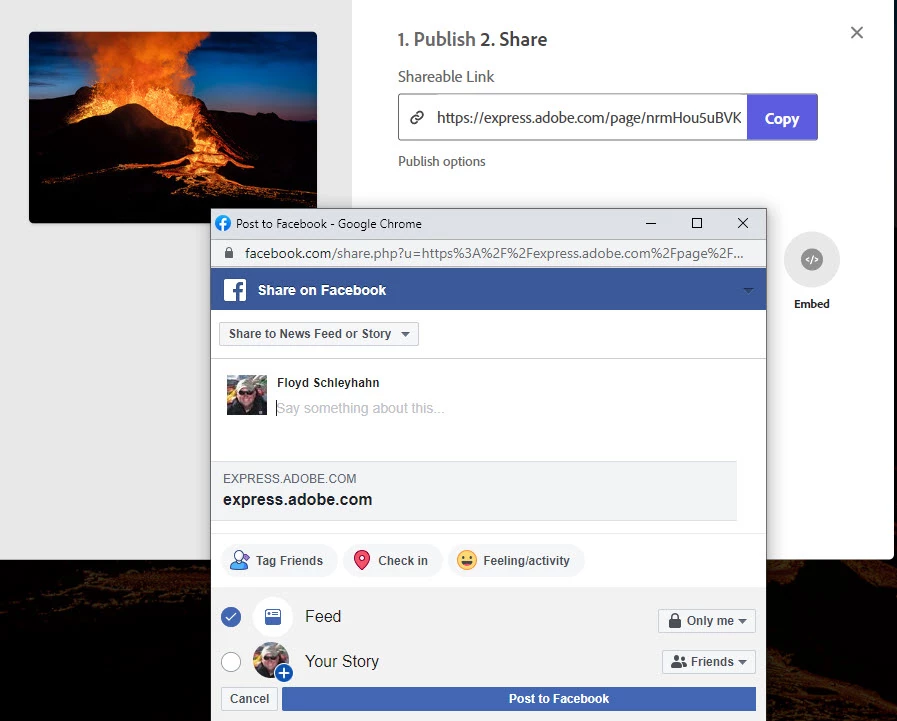
In reference to the attached image, I am trying to post an Adobe Creative Cloud Express online book that I created on Facebook, but instead of getting a "picture" of my title page of the project, all I get is a link with a light gray background that says "express.adobe.com".  With Adobe Spark, the title page thumbnail would get displayed as a background image to the link, thereby drawing attention.  Is it possible for Adobe Creative Cloud Express to generate a thumbnail like Adobe Spark did instead of just a boring gray background?  I tried using the text within the "Embed" option, but it just displays a JPG of the title page and doesn't open the actual online book.  Any assistance will be appreciated.  Thank you
1 reply

Amitej S
Community Manager
Community Manager
April 21, 2022

Hi there,


Thanks for reaching out; this shouldn't be happening. I want to inform you that we were able to replicate this on our end, and it is shared for further investigation. Once we have any info regarding this, you'll be updated.


Meanwhile, could you try posting a web page that is shared with you, and see if that also displays a light grey background saying "express.adobe.com".


Regards,

Amitej

FSchleyhahn
Inspiring
April 21, 2022

What I ended up doing was using https://anyimage.io/# to create a "clickable" image--I took a screenshot of my Cloud Express project's title page then uploaded that image to the aforementioned website then used the link for the finished project as the target and lo and behold, it worked!!!  The more pressing issue is the inability for Creative Cloud Express to auto-rotate into a landscape position when a phone or tablet is rotated. This is a showstopper if you ask me--being able to utilize a full width image but only being able to see it in portrait mode takes away the "punch".  Further, only a sliver of the images that are used on "Glideshows" gets displayed--it crops a beautiful landscape image into a portrait mode, so only the center of the picture shows up.  I can't figure a work-around for this problem like I could for the thumbnail, so I would really appreciate it if Adobe could allow these projects to get displayed in landscape mode when viewed on a tablet or phone.  I do believe that with Adobe Spark, this was possible (I have made several projects using Spark and don't recall this being an issue).  Many thanks for your assistance.