



themewesetech
Inspiring
August 24, 2025
Answered

Paste and Match Style is NOW A THING!

  • August 24, 2025
  • 4 replies
  • 679 views

There were some old posts on copying and pasting. I was among those frustrated with having stylized text on to need to copy and paste in different words. I was this many days old when I found that if instead of using the quick keyboard shortcut for paste, if you click the three dots, there is now an option to "Paste and Match Style"!
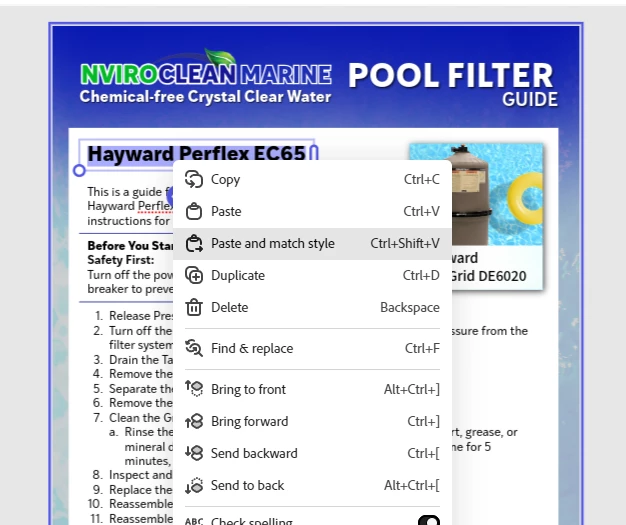
It is a game changer for Templates and those of us that do not design in any structured way whatsoever and need to copy and paste a lot of text after everything is pleasing to the eye.

I needed to replace not just the Header but also the image's caption. Being able to design a page, duplicate and then just paste from the spreadsheet and NOT lost my style settings is just a yummy thing!


P.S. If you already knew this, why didn't you tell me 😂

Correct answer Jimmy Flame

CTRL+SHIFT+V all day long! Glad you found it. It's a low-key amazing (and time saving) feature. 

4 replies

Participant
October 14, 2025

Being able to keep styles intact, especially for headers, captions, and spreadsheet text, makes designing templates so much smoother. Honestly, why didn’t anyone tell me sooner?

Thanks for sharing this tip it’s going to save so much time and frustration

Participant
September 17, 2025

Wow, didn’t know about Paste and Match Style either total game changer! Thanks for sharing this tip 🙌 More little workflow hacks like this at 2WINS 

Jimmy Flame
Community Expert
Jimmy FlameCommunity ExpertCorrect answer
Community Expert
August 28, 2025

CTRL+SHIFT+V all day long! Glad you found it. It's a low-key amazing (and time saving) feature. 

- Jimmy Flame
Amitej S
Community Manager
Community Manager
August 25, 2025

Hey @TiffanyMTC621, Welcome to our Adobe Express community! 


Thank you so much for sharing this tip! The Paste and Match Style feature can save a lot of time and effort, especially when replacing text across designs. It’s great to see how it’s helping your workflow, and I’m sure others will find this just as valuable. It’s a small detail that makes a big difference, and we really appreciate you taking the time to highlight it here for our community users.


Feel free to post discoveries, tips, and tricks for our community! 


Glad to have you here!


Best,

Amitej