


December 8, 2025
Question

Removing Student from Adobe Classroom

  • December 8, 2025
  • 1 reply
  • 75 views

I have several students that ended up added to the wrong period in Adobe Classroom. I was going to simply remove then, but then I got a confirmation message with contradictory statements and I'm not sure which to follow, because one is a bit concerning.
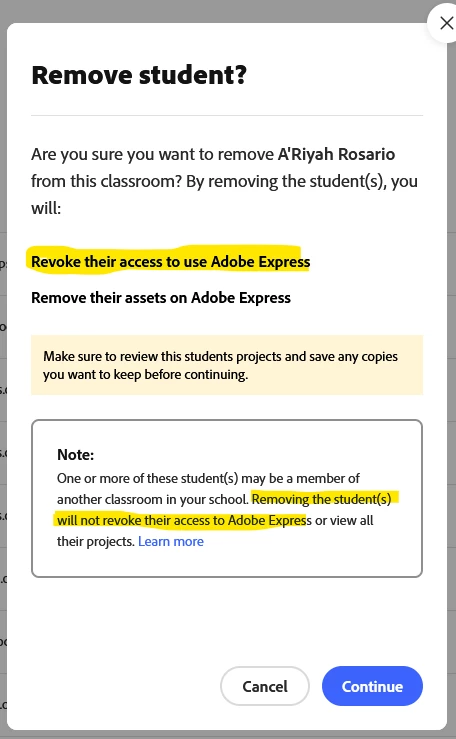
 

Now I'm wondering, if I remove these students, will the lose all access to Adobe Classroom or just to this specific classroom.

1 reply

Community Manager
December 9, 2025

Hi @Exuberant_athlete5EA3,


Thanks for your question! Here’s how it works when you remove a student from an Adobe Classroom:

  • If the student’s account was set up by your school or district's IT team (such as through Admin Console, Clever, or ClassLink), removing them only removes them from that specific classroom. They’ll still be able to use Adobe Express and any other classrooms they’re part of.

  • If the student joined using your invite link, class code, or email invite, removing them could delete their account completely. In that case, they’d lose access to Adobe Express unless they’re enrolled in another classroom.

A few tips to be safe:

  • If you’re unsure, consider using Block instead of Remove.

  • Or move students to the correct classroom first.

  • Encourage students to duplicate important projects to “Your Stuff” so nothing gets lost.

This way, you can make changes without risking any work being lost.


^MM